Website, or application?
The test is whether the browser is showing information or doing work. A website presents pages that are the same for everyone who loads them. An application keeps state: it knows who is signed in, what they are allowed to touch, what has happened to a record so far and what may happen to it next. If two people need to see different things, or the same thing at different stages, you are scoping an application.
Most businesses end up with both, joined at a sign-in. The public pages explain a service and invite an enquiry; behind the login, a coordinator works a queue, a manager approves something and a customer checks progress. They share a domain and a look, and little else: different responsibilities, different risks, different acceptance criteria. Scoping them as one thing is where estimates go wrong.

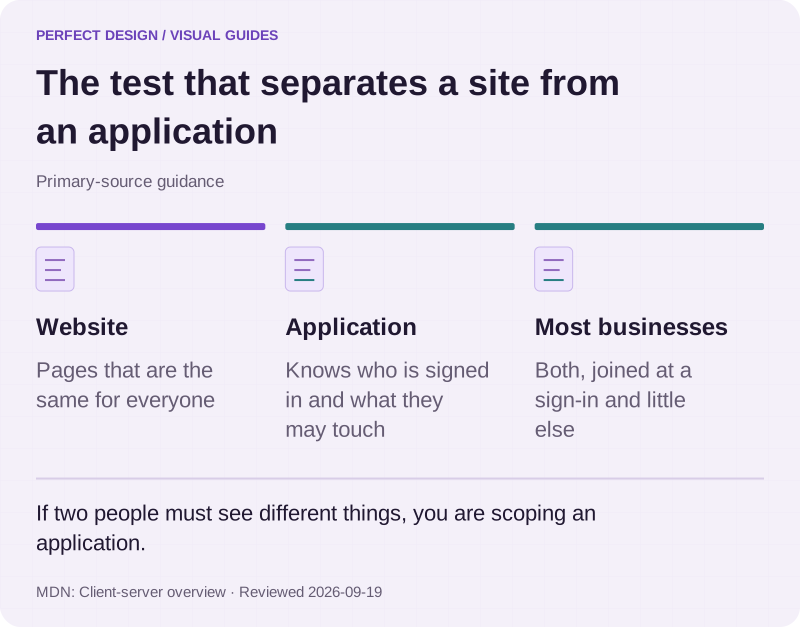
The test that separates a site from an application
Primary-source guidance. If two people must see different things, you are scoping an application.
Source: MDN: Client-server overview. Reviewed .
Read the graphic as text
- Website. Pages that are the same for everyone
- Application. Knows who is signed in and what they may touch
- Most businesses. Both, joined at a sign-in and little else
Why browser delivery often wins for internal tools
For work done at desks, counters, on workshop tablets and occasionally on a phone, the browser has advantages that have nothing to do with technology preference. There is nothing to install and nothing for staff to update. A fix reaches everyone at the next page load, with no store review between you and your own team. It runs on whatever hardware the business already has, and access is a link you can revoke.
The case for a mobile app is a different one: notifications people actually receive, camera and location access, an identity that persists on a personal device, or real use without a signal. Those are good reasons and we build for them, under mobile app development. What we would not do is put an internal tool through a store review cycle because an app sounded more substantial.
| Consideration | Browser application | Installable browser app | Native mobile app |
|---|---|---|---|
| How it reaches people | A link, on any device with a browser | A link, plus an icon on the home screen | A store listing the user downloads |
| Updating it | Next page load, for everyone | Next load, once the cached version refreshes | A new build, reviewed before release |
| Device features | What the browser exposes | What the browser exposes, plus installation | The fullest access to the device |
| Without a connection | Needs one | Possible for defined screens, if built and tested for it | Strongest, when designed for it |
| Usually suits | Staff tools, portals, dashboards | Daily tools on shared or personal devices | Consumer apps and work on the move |
An installable browser application, usually called a progressive web app, is a browser application with extra requirements attached: an icon on the home screen, defined behaviour when the connection drops, sometimes notifications. Treat each as a requirement to decide and test rather than a free upgrade, because each has to be built and verified on the devices your people really use.

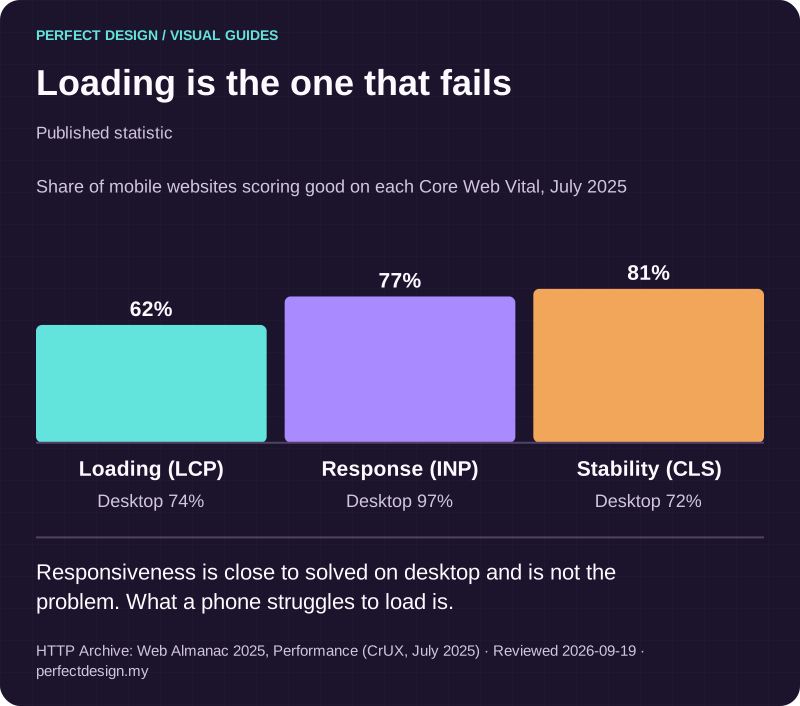
Loading is the one that fails
Published statistic. Responsiveness is close to solved on desktop and is not the problem. What a phone struggles to load is.
Source: HTTP Archive: Web Almanac 2025, Performance (CrUX, July 2025). Reviewed .
Read the graphic as text
- Loading (LCP): 62%. Desktop 74%
- Response (INP): 77%. Desktop 97%
- Stability (CLS): 81%. Desktop 72%
Chart scale: Share of mobile websites scoring good on each Core Web Vital, July 2025.
Accounts, records and workflow states
A feature list describes screens. An application is described by who acts, which record they change, what state it moves to, what happens when that move is refused, and how anyone would prove it. Turning the first into the second is most of what scoping means. The table below does it for an illustrative enquiry and service-request workflow; the roles and policies are assumed for teaching, and the real ones are yours to agree.
| Workflow step | Assumed actor | Proposed system response | Exception | Acceptance evidence to collect |
|---|---|---|---|---|
| An enquiry is submitted | Website visitor | Create a reviewable record, acknowledge it and place it in the new queue | The submission is incomplete or fails validation | Test valid and invalid submissions, and confirm the record and state each produced |
| The enquiry is reviewed and assigned | Operations coordinator | Set an owner and a due date, and record the state change | It duplicates another record, or nobody can be assigned | Test assignment and duplicate handling, and that the change is visible in the history |
| A proposed next step is approved | Account manager | Record the approval, notify the owner and release the next action | Approval is refused, or a connected system is unavailable | Test permitted and denied approvals, and the recovery state after a failure |
Notice what the last column is not: a result. It is the test somebody will run before release. Alongside it, scope the records themselves, which system owns each field, what happens to invalid input, what a failed integration leaves behind, who is notified, and how a person resolves it by hand when the automation cannot.
Who can see and do what
Proving who somebody is and deciding what they may do are two different problems, and the second is the one left until the interface is built. Map it first: the roles, the records each role may reach, the actions it may take on them, and what happens when someone attempts something they should not.
- Start from refusal and grant deliberately. Each role gets only the access its work needs.
- Check on the server, on every request. Hiding a button is presentation, not permission.
- Decide what a refusal looks like. A clear message, a recorded attempt, and no hint of what exists.
- Scope visibility as well as action. Lists, exports, notifications and search results all reveal records.
- Test the negative paths. Permissions are proved by a refused action, not a successful one.

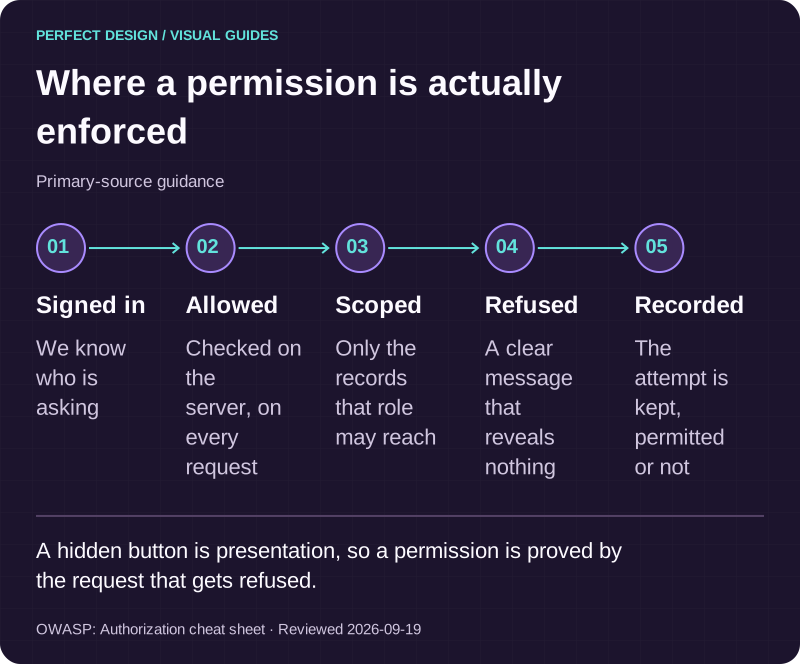
Where a permission is actually enforced
Primary-source guidance. A hidden button is presentation, so a permission is proved by the request that gets refused.
Source: OWASP: Authorization cheat sheet. Reviewed .
Read the graphic as text
- Signed in. We know who is asking
- Allowed. Checked on the server, on every request
- Scoped. Only the records that role may reach
- Refused. A clear message that reveals nothing
- Recorded. The attempt is kept, permitted or not
Integrations and permissions are prerequisites
An integration is not scope until somebody has checked it. Before treating one as feasible, name the system, the record owner on each side, the direction each field moves, what triggers the exchange, what happens when it fails and who watches it afterwards. Feasibility comes down to the interfaces actually available, the access your business can grant, the quality of the data and the third-party terms. Where customer records and operational workflow must stay in step, CRM and system integrations goes further.
What to bring
You do not need a specification. Bring the current situation, the change you want, the people affected, the systems in use, one real workflow with its exception, and your constraints. Label what you do not know as something to investigate rather than guessing: an honest unknown is easier to scope than a confident assumption.
A simple worksheet helps more than a long document. One page per workflow: the users and what each may do, the records and who owns each field, the states and the moves between them, the integrations, the constraints that are not negotiable, the acceptance questions and the open risks. Used as a conversation aid rather than a contract, it keeps a scoping meeting on the decisions instead of the wish list.
Delivery options, and where this page stops
Four questions settle the delivery choice: whether an existing product already handles the core process, where you genuinely need to differ from it, which integrations and permissions are required, and who owns change after launch. That wider decision belongs to custom software development. This page prepares the narrower one, whether the work belongs in a browser and what would have to be true for it to succeed there.
The recurring parts have their own pages: accounts and portals for sign-in and role-specific views, admin dashboards for the screens your team works in daily, and booking and scheduling where availability and capacity are involved.
Some decisions stay open on purpose at this stage: how the application is structured internally, how the data is modelled, the mechanics of each interface, and whether any part of it eventually warrants a mobile platform of its own. Those are settled in scoping with the evidence in front of us, not decided on a service page.

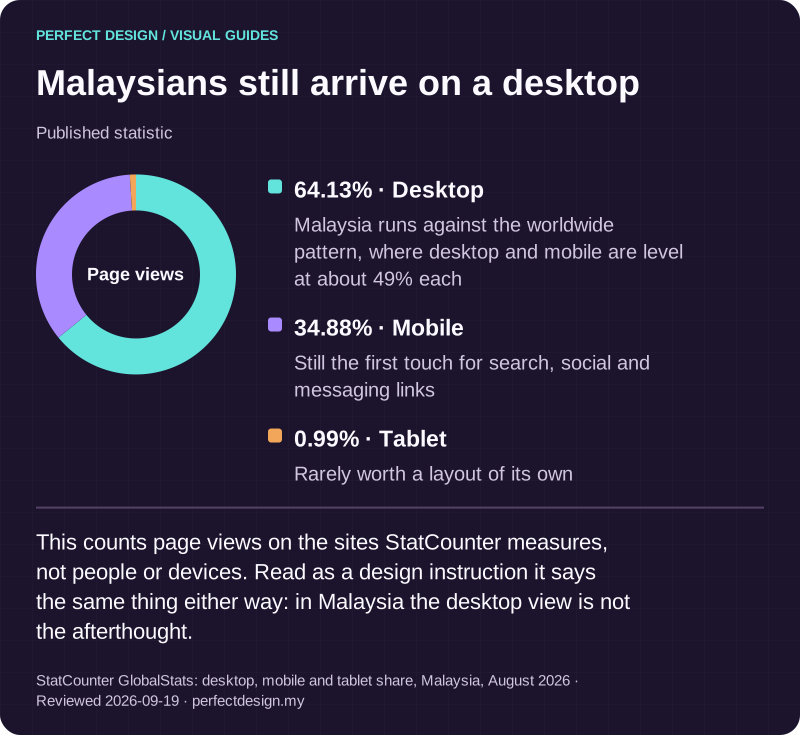
Malaysians still arrive on a desktop
Published statistic. This counts page views on the sites StatCounter measures, not people or devices. Read as a design instruction it says the same thing either way: in Malaysia the desktop view is not the afterthought.
Source: StatCounter GlobalStats: desktop, mobile and tablet share, Malaysia, August 2026. Reviewed .
Read the graphic as text
Page views
- Desktop: 64.13%. Malaysia runs against the worldwide pattern, where desktop and mobile are level at about 49% each
- Mobile: 34.88%. Still the first touch for search, social and messaging links
- Tablet: 0.99%. Rarely worth a layout of its own
Validation, ownership and life after launch
Acceptance is agreed before the build rather than argued after it. Every row of the scope carries its expected response, its exception and the evidence to collect, across four categories: the normal path, a denied action, a failed integration and a handoff between people. Run those on a release candidate and the release conversation is about evidence instead of opinion.
Ownership is unambiguous. You own the source code in your own repository, the domain, the service accounts in your name and the data in the system, with no lock-in if you move provider. Care for a system with a real backend starts from RM 250 a month, confirmed against what was launched, and support requests are normally answered in under one working day, which is how we work rather than a contractual guarantee. When you are ready, tell us about the workflow and we will say what needs investigating first.