

Start from the workflow, not the product
The useful first question is not which HR system to buy. It is which workflow is costing you: the leave requests sitting in a manager's inbox, the claims reimbursed from a spreadsheet nobody reconciles, the offer letters and contracts living in one person's drive, or the fact that a departed employee's access was only noticed three months later.
Once the workflow is named, three routes are worth comparing honestly. Configuring a product you already own is the cheapest answer when it handles your core process and you are fighting only its defaults. Integrating a platform makes sense when it covers most of the work but cannot reach a system it needs to talk to. Commissioning a system is justified when the rules are genuinely yours, when several disconnected tools are being held together by hand, or when the data cannot sit where the product insists on keeping it. We will say when we think one of the first two applies.

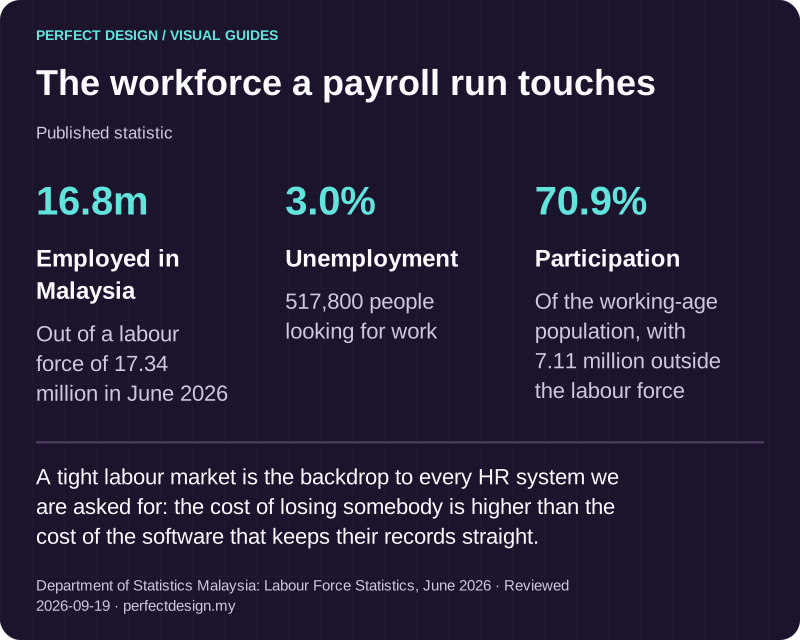
The workforce a payroll run touches
Published statistic. A tight labour market is the backdrop to every HR system we are asked for: the cost of losing somebody is higher than the cost of the software that keeps their records straight.
Source: Department of Statistics Malaysia: Labour Force Statistics, June 2026. Reviewed .
Read the graphic as text
- Employed in Malaysia: 16.8m. Out of a labour force of 17.34 million in June 2026
- Unemployment: 3.0%. 517,800 people looking for work
- Participation: 70.9%. Of the working-age population, with 7.11 million outside the labour force
What belongs in scope
An HR system is a small number of records and a large number of decisions about them. The records are people, employment details, leave balances, claims, documents and approvals. The decisions are who may create, view, change, approve, export and remove each of those, and what evidence each action leaves behind. Scope is best written as those two lists rather than as a feature checklist, because the features are ordinary and the rules are not.
Leave is where policy stops being generic
Leave looks simple until you write your own rules down. Entitlement usually varies by category and by length of service. Joiners and leavers need pro-rating, and the method has to be stated rather than assumed. Carry-forward is its own small system: how much may move into the new year, whether it expires on a date, and whether the balance consumed first is the carried one or the current one. Then come half days, unpaid leave, leave taken before it is accrued, replacement time for working a public holiday, and the calendar of holidays that differ by state.
Those entitlement rules come from your employment contracts, your handbook and current Malaysian employment law, which is your adviser's territory rather than ours. We will not invent them and we would not want you accepting numbers from a web page either. What a system has to do is apply the rules you confirm consistently, show its working when somebody disputes a balance, and make a rule change explicit rather than a quiet edit to a number.
Claims, documents and the rest of the admin
Claims follow the same shape as leave and fail in the same places: a submission with evidence attached, a limit or a category that constrains it, an approval route, and a handoff to whoever actually pays. The awkward cases are a claim approved by somebody who should not approve their own, a receipt that arrives two months late, and a reimbursement that has to be traceable afterwards. Documents need their own thinking, because contracts, letters and identification are the most sensitive things in the system: who may upload, who may read, how long each is kept, and what happens to them when somebody leaves.
Joining and leaving are the two moments where an HR system earns its keep, and the two most often left out of scope. Onboarding is a checklist with owners and dates: accounts to create, documents to sign, equipment to issue, a probation date somebody has to remember. Offboarding is the same list in reverse with a deadline attached, because access that outlives an employment is the failure people discover last. Both are ordinary workflows, and both are far easier to build in at the start than to add once thousands of records already exist.

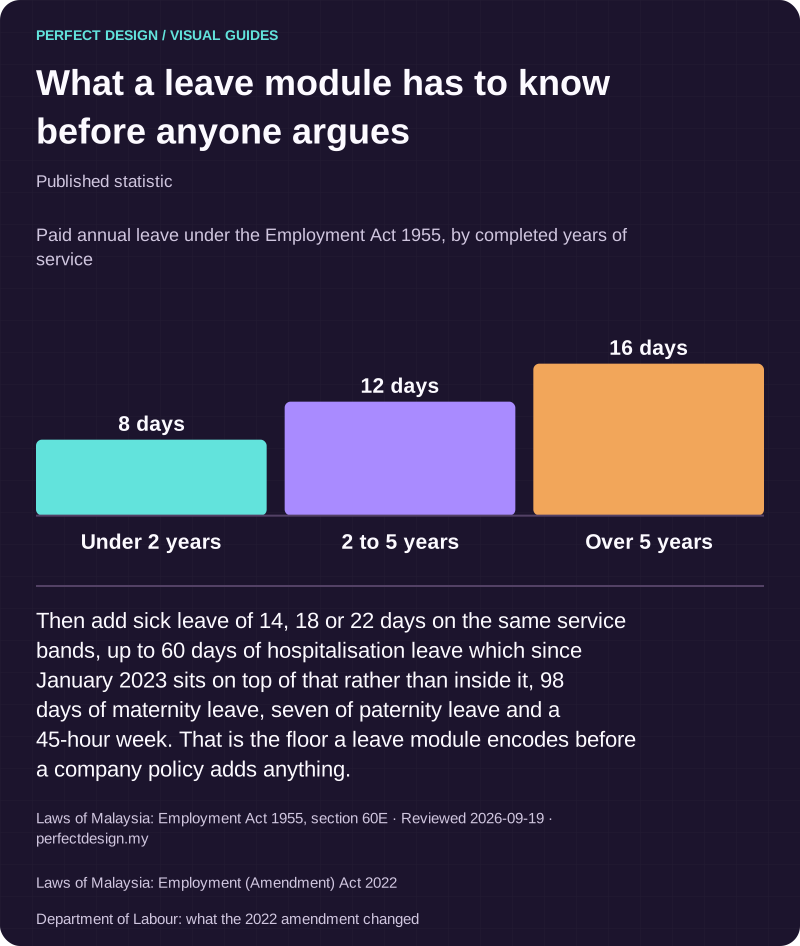
What a leave module has to know before anyone argues
Published statistic. Then add sick leave of 14, 18 or 22 days on the same service bands, up to 60 days of hospitalisation leave which since January 2023 sits on top of that rather than inside it, 98 days of maternity leave, seven of paternity leave and a 45-hour week. That is the floor a leave module encodes before a company policy adds anything.
Source: Laws of Malaysia: Employment Act 1955, section 60E. Reviewed .
Also: Laws of Malaysia: Employment (Amendment) Act 2022.
Also: Department of Labour: what the 2022 amendment changed.
Read the graphic as text
- Under 2 years: 8 days.
- 2 to 5 years: 12 days.
- Over 5 years: 16 days.
Chart scale: Paid annual leave under the Employment Act 1955, by completed years of service.
How a leave request should behave
The table below walks one fictional leave workflow to show how a scope is written: normal path, exception and the evidence to collect before accepting the work. The roles and policies are assumptions used for illustration, payroll and statutory calculation are deliberately outside it, and the last column describes tests to run rather than results anybody has passed.
| Workflow step | Assumed actor | Proposed system response | Exception | Acceptance evidence to collect |
|---|---|---|---|---|
| Request leave | Employee | Submit dates and a category, checked against the balance under an agreed fictional policy | An overlapping or incomplete request stays visibly unresolved rather than being silently accepted | Request-validation tests and checks on who can see the request |
| Approve or decline | Assigned manager | Record a reasoned decision within the authority the policy assumes | Self-approval, or a request from another team, needs the agreed access restriction | Role, decision and notification observations for each route |
| Close employee access | HR administrator | Remove access and apply the agreed retention decision for the records left behind | Unassigned ownership or an unresolved retention question needs review before anything is deleted | Revocation checks and a documented retention decision |
Each exception in that table changes something structural rather than cosmetic. Overlapping requests need a rule about who sees a colleague's dates. Self-approval needs an escalation route and a delegate for when the manager is themselves on leave. Offboarding needs an owner for records whose manager has also left. The same method transfers to any other HR workflow you want in scope: write the normal path, name the exception, then say what evidence would convince you it works.

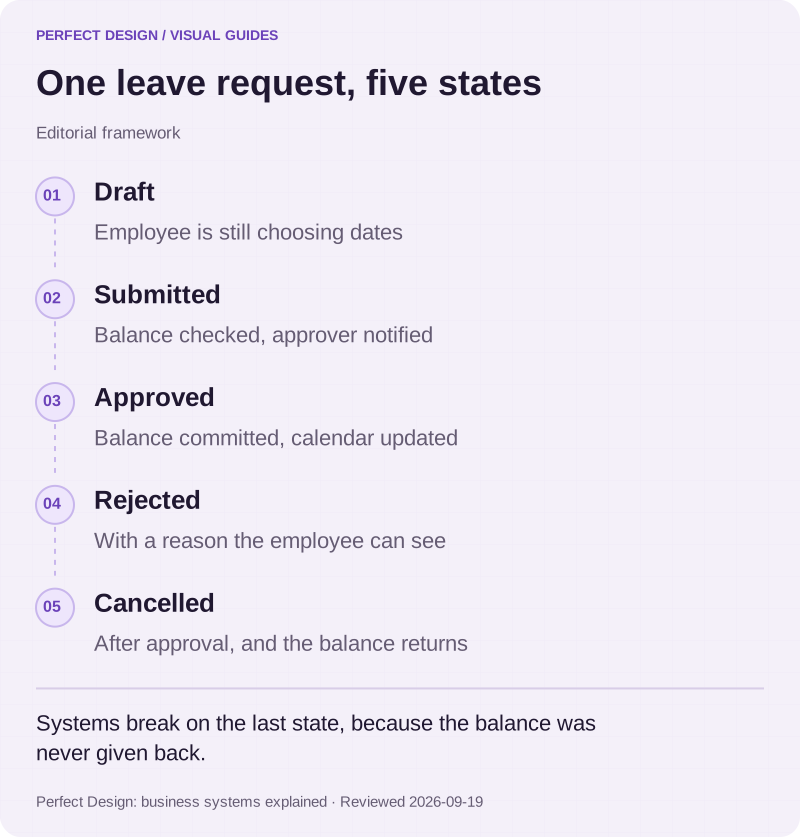
One leave request, five states
Editorial framework. Systems break on the last state, because the balance was never given back.
Basis: Perfect Design: business systems explained. Reviewed .
Read the graphic as text
- Draft. Employee is still choosing dates
- Submitted. Balance checked, approver notified
- Approved. Balance committed, calendar updated
- Rejected. With a reason the employee can see
- Cancelled. After approval, and the balance returns
Who can see, change, approve and remove access
Permissions in an HR system are not one setting. View, create, edit, approve, export and revoke are separate powers, and people hold different combinations of them over different groups of colleagues. A manager sees their team's leave but not their salaries. A finance colleague sees claim totals but not medical notes attached to them. An HR administrator sees nearly everything and should leave a trail every time they do.
- Who may see compensation, and whether anyone may see it for a colleague at the same level
- What happens when a manager is on leave: a delegate, an acting manager, or a queue that waits
- Whether a manager may approve something affecting themselves, and what the escalation route is
- Who owns the records of somebody whose manager has left the company
- Who may export, and what an export contains once it is a file on a laptop
- How quickly access ends when somebody leaves, and who confirms it did
Access control is also the part of an HR system most worth testing deliberately. Signing in as each role and confirming what is not visible is a short exercise that catches the errors nobody notices in a demonstration, because a demonstration is always given by somebody with full rights. Accounts and portals covers the sign-in layer these permissions sit on.

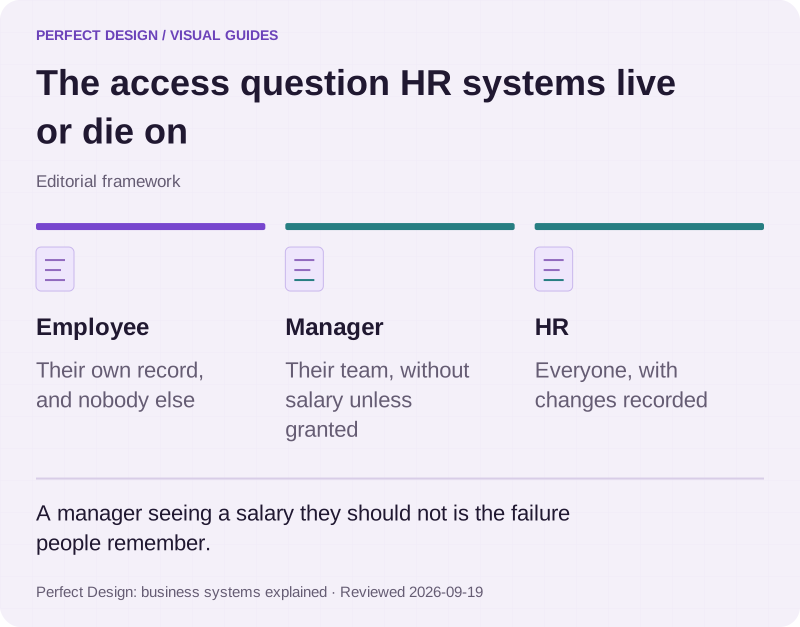
The access question HR systems live or die on
Editorial framework. A manager seeing a salary they should not is the failure people remember.
Basis: Perfect Design: business systems explained. Reviewed .
Read the graphic as text
- Employee. Their own record, and nobody else
- Manager. Their team, without salary unless granted
- HR. Everyone, with changes recorded
Payroll is a boundary, not a feature
Payroll calculation, statutory contributions and filing are a specialist domain with rules that change and consequences when they are wrong. Treat them as a boundary. The practical question is what crosses it: usually approved leave that affects pay, approved claims for reimbursement, and joiner or leaver dates, moving as an agreed export or a connection with a named owner on each side.
Whether a connection is feasible depends on four things we check before anything enters a scope: whether an interface exists, who can grant access, whether the data is clean enough to rely on, and what the vendor terms allow. Where it is not, a reviewed file and a reconciliation step is an honest answer that works. CRM and integrations describes how we approach connections of this kind.

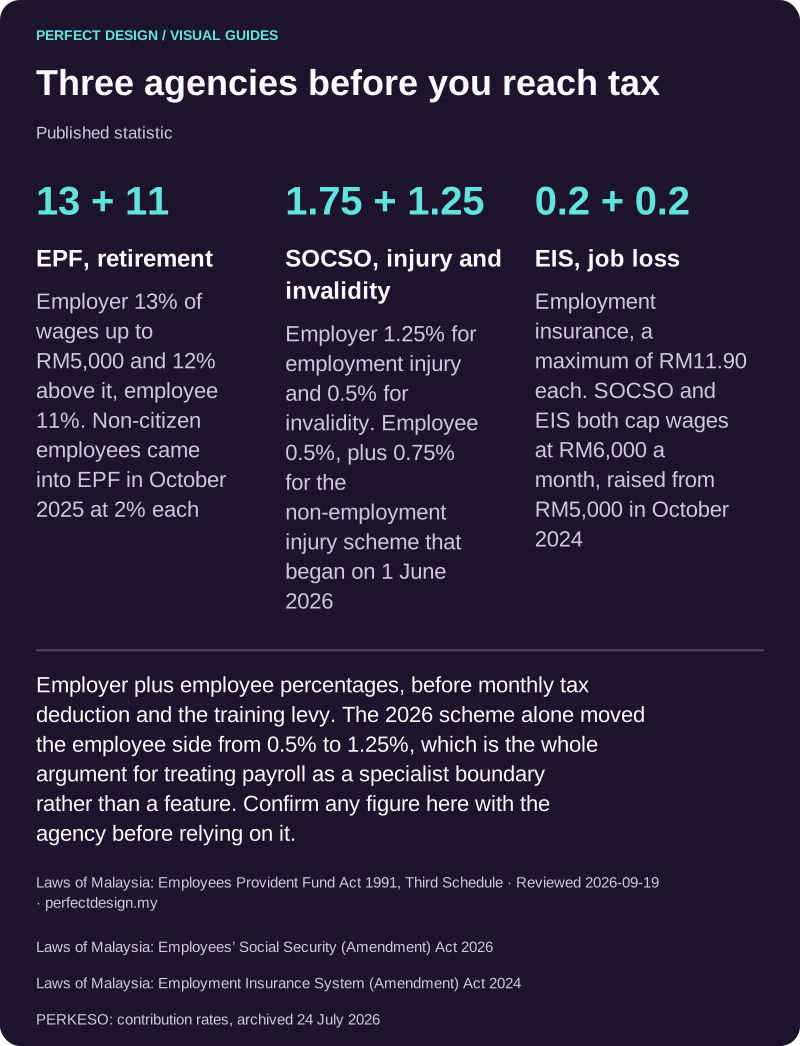
Three agencies before you reach tax
Published statistic. Employer plus employee percentages, before monthly tax deduction and the training levy. The 2026 scheme alone moved the employee side from 0.5% to 1.25%, which is the whole argument for treating payroll as a specialist boundary rather than a feature. Confirm any figure here with the agency before relying on it.
Source: Laws of Malaysia: Employees Provident Fund Act 1991, Third Schedule. Reviewed .
Also: Laws of Malaysia: Employees’ Social Security (Amendment) Act 2026.
Also: Laws of Malaysia: Employment Insurance System (Amendment) Act 2024.
Also: PERKESO: contribution rates, archived 24 July 2026.
Read the graphic as text
- EPF, retirement: 13 + 11. Employer 13% of wages up to RM5,000 and 12% above it, employee 11%. Non-citizen employees came into EPF in October 2025 at 2% each
- SOCSO, injury and invalidity: 1.75 + 1.25. Employer 1.25% for employment injury and 0.5% for invalidity. Employee 0.5%, plus 0.75% for the non-employment injury scheme that began on 1 June 2026
- EIS, job loss: 0.2 + 0.2. Employment insurance, a maximum of RM11.90 each. SOCSO and EIS both cap wages at RM6,000 a month, raised from RM5,000 in October 2024
What to bring to a scoping conversation
Bring one workflow that currently costs you time, your written policy for it, the roles involved and who may see what, the systems already in use and who administers them, the exceptions that come up often, and the checks you would want to see before accepting the work. That is enough to say whether configuring what you own, connecting it to something else, or building is the sensible route. If you would rather start from the current process, talk it through with us.