What separates a publication site from a brochure site
A brochure site explains an offer and changes a few times a year. A publication site is an operation. Something is written, reviewed, corrected, scheduled, published, found and eventually updated or retired, week after week, by people who should not all have the same permissions. The website is the visible end of that, which is why scoping one as a larger brochure site is the mistake that surfaces six months later.
So the first question is not which platform, but whether the workflow is justified. If you plan a handful of announcements a year, a news section on your business website is the proportionate answer. If several people will publish continuously and the archive has to stay useful, the structure, roles, archives and migration decisions below all belong in the scope.

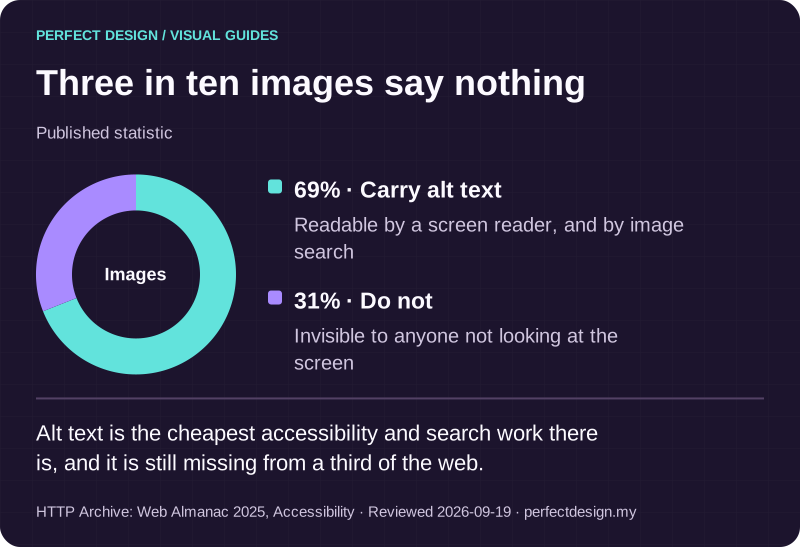
Three in ten images say nothing
Published statistic. Alt text is the cheapest accessibility and search work there is, and it is still missing from a third of the web.
Source: HTTP Archive: Web Almanac 2025, Accessibility. Reviewed .
Read the graphic as text
Images
- Carry alt text: 69%. Readable by a screen reader, and by image search
- Do not: 31%. Invisible to anyone not looking at the screen
Decide the structure before the first article
The expensive mistake is publishing eighty articles and then deciding how the site should be organised, because retrofitting structure means rewriting, re-tagging and redirecting work that already has readers. Three things get confused here. An article type is a kind of content with its own fields, such as a news item, a long guide, a case note or an event. A taxonomy term is a label that groups content across types, such as a topic or a region. An archive route is a page a reader lands on, such as everything under one topic, everything by one author, or everything from last year.
For each article type, agree the fields before anything is built: title, standfirst, body, author, reviewer, topic, publication state, correction status, and what happens to the address if the piece is retired. Keep the taxonomy small enough that two editors would tag the same article identically, because two hundred tags used once each is a structure that has already failed. Platform documentation is a reference rather than a default: the Odoo blog documentation, for example, describes tags and tag categories, multiple blogs and aggregated landing pages, which is one vendor's arrangement of the same ideas.

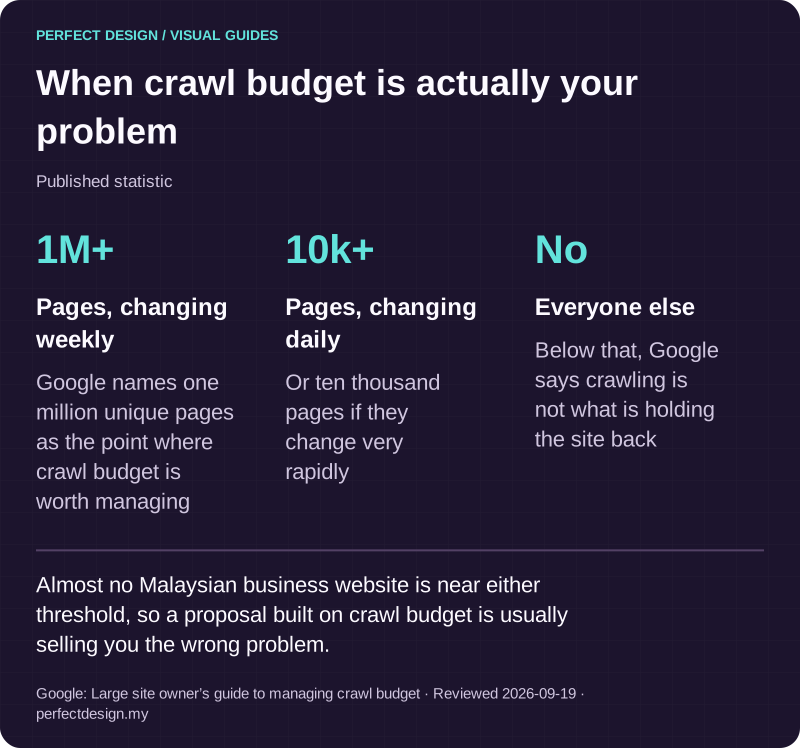
When crawl budget is actually your problem
Published statistic. Almost no Malaysian business website is near either threshold, so a proposal built on crawl budget is usually selling you the wrong problem.
Source: Google: Large site owner’s guide to managing crawl budget. Reviewed .
Read the graphic as text
- Pages, changing weekly: 1M+. Google names one million unique pages as the point where crawl budget is worth managing
- Pages, changing daily: 10k+. Or ten thousand pages if they change very rapidly
- Everyone else: No. Below that, Google says crawling is not what is holding the site back
The workflow from draft to archive
An editorial site runs on states, and each needs an accountable person, an expected response from the system and an exception path. The sequence we normally propose is draft, editorial review, approval, scheduled publication, correction, and finally an archive or redirect decision. Scheduling matters more than it sounds: preparing a piece now and having it appear at an agreed time is what lets a small team publish steadily rather than in bursts. Preview matters too, because a reviewer should see the article as readers will, not as a form.
The table below uses an assumed specialist publication with a small editorial team. The actors and policies are planning assumptions, and the last column lists evidence to collect rather than checks already passed.
| Workflow step | Assumed actor | Proposed system response | Exception | Acceptance evidence to collect |
|---|---|---|---|---|
| Draft an article | Author | Capture the agreed topic, author and supporting references with the text | A fact or permission is missing, so the piece goes to editorial review rather than forward | Required-field and citation checks run on a real draft |
| Approve publication | Editor | Publish or schedule the approved version with the right navigation and accessible content | An unauthorised user or an unsourced claim holds that revision | Permission, preview and publication-history tests |
| Update or archive | Content owner | Record a correction, or take an explicit archive or address decision | Duplicate or moved content needs an agreed canonical or redirect decision | Revision history and destination checks across the affected addresses |

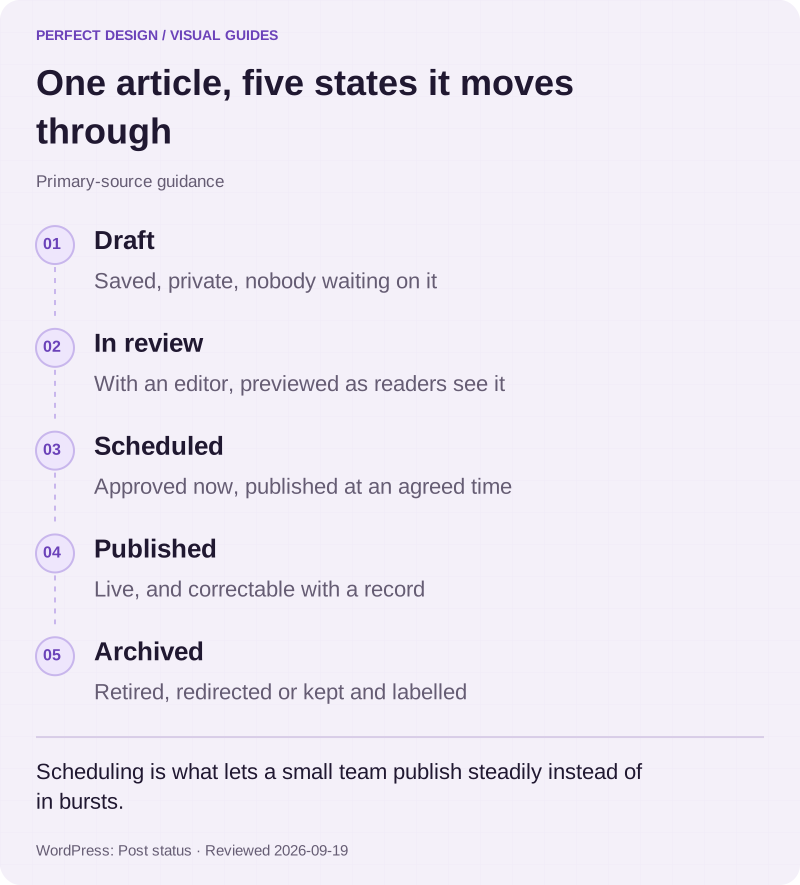
One article, five states it moves through
Primary-source guidance. Scheduling is what lets a small team publish steadily instead of in bursts.
Source: WordPress: Post status. Reviewed .
Read the graphic as text
- Draft. Saved, private, nobody waiting on it
- In review. With an editor, previewed as readers see it
- Scheduled. Approved now, published at an agreed time
- Published. Live, and correctable with a record
- Archived. Retired, redirected or kept and labelled
Who may do what
Drafting, editing someone else's work, publishing, managing the taxonomy, uploading media and changing templates are six different permissions, and granting all six to everyone is how a site drifts. WordPress documentation shows how granular this gets: it describes roles such as Editor, Author and Contributor with different publishing and editing capabilities, distinguishes single-site from Multisite behaviour, and notes that capabilities can be assigned to custom roles, with permission checks at specific endpoints affecting editing workflows. That is documented WordPress behaviour rather than a universal rule, but the questions it forces are the right ones on any platform, including the one covered on our WordPress development page.
Staff controls are not reader access
Keep two decisions apart. Staff editing permissions govern who may draft, revise, publish, manage taxonomy or change a template. Reader access governs what a visitor may see or receive. Conflating them is how a contributor ends up editing the homepage because somebody needed them to upload a photograph. How we build the staff side is set out on client-editable content.
Authorship is a field, not a byline
On a publication the author is an entity rather than a line of text: a person with a profile, a role, relevant credentials and an archive of everything they have written. Where expertise carries weight, model a named reviewer alongside the author, and record when a piece was last reviewed rather than only when it first appeared. Those fields cost nothing at the start and are painful to backfill across four hundred articles later.
Archives and pagination that survive the volume
At thirty articles any navigation works. At nine hundred, only structure works. The routes a reader needs are the topic page, the chronological archive, the author archive, related content at the end of a piece, and a search that looks inside articles rather than at titles alone. Each should fall out of the content model rather than being bolted on: if a topic is a real field, the topic page builds itself.
Pagination is where large publications quietly break. Pages need real links a person and a crawler can both follow, a stable order so an item does not appear twice, and a decision about which address is canonical when one article sits under three topics. Endless scrolling with no links beneath it hides most of an archive from search. Our catalogue and search page covers search at scale, and search visibility covers how discovery is measured afterwards. Orialis Group, our concept prototype of a corporate group site, puts the same routes to work in a newsroom and an investor centre.
Subscriptions are not accounts
A subscription route lets a reader ask to be told when something new appears. It implies no account and no restricted archive; the Odoo blog documentation, for instance, treats subscription as a field on the blog rather than an access system. Registered or paid reader access is a separate project, with rules about who qualifies, decisions about which content is visible to whom, and someone accountable for the accounts. Billing and authentication sit outside this page, and it is worth deciding whether you need them before anything else.

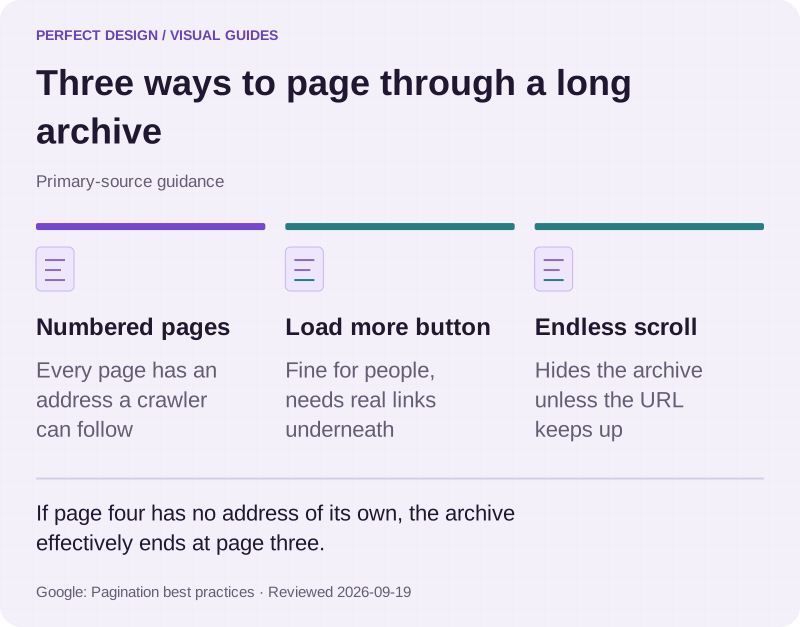
Three ways to page through a long archive
Primary-source guidance. If page four has no address of its own, the archive effectively ends at page three.
Source: Google: Pagination best practices. Reviewed .
Read the graphic as text
- Numbered pages. Every page has an address a crawler can follow
- Load more button. Fine for people, needs real links underneath
- Endless scroll. Hides the archive unless the URL keeps up
Staying fast as the library grows
A publication slows down the way a house gets untidy, gradually and invisibly. Every article adds images, every topic page has more to assemble, related-content lookups get more expensive, and the deep archive pages nobody tests suffer first. What holds up is rendering pages once and serving them from cache, rebuilding only what changed when something is published, keeping image weight under control, and measuring the archive rather than only the homepage.

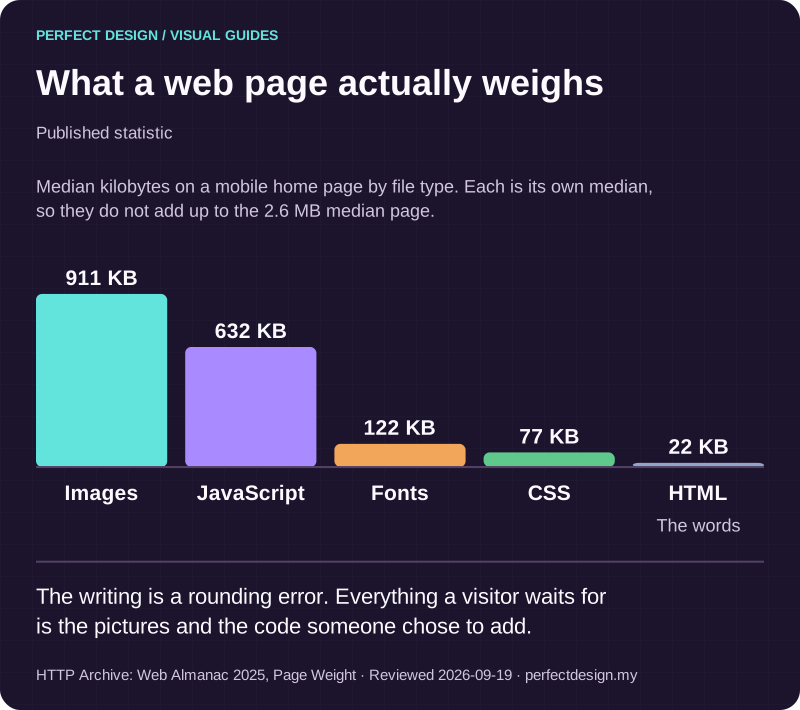
What a web page actually weighs
Published statistic. The writing is a rounding error. Everything a visitor waits for is the pictures and the code someone chose to add.
Source: HTTP Archive: Web Almanac 2025, Page Weight. Reviewed .
Read the graphic as text
- Images: 911 KB.
- JavaScript: 632 KB.
- Fonts: 122 KB.
- CSS: 77 KB.
- HTML: 22 KB. The words
Chart scale: Median kilobytes on a mobile home page by file type. Each is its own median, so they do not add up to the 2.6 MB median page..
Migrating without losing what you have built
Most publication projects are migrations, and the content is the risky part rather than the design. Inventory first: every piece, who owns it, its identifier and address, what links to it and what it depends on. Then decide per item whether it is kept, merged, rewritten, archived or redirected, which is an editorial judgement rather than a technical one. Agree the address handling and the measurement baseline before launch, because that is the moment an old address either keeps its readers or quietly loses them. Website redesign covers that handling in detail.
PITC Training is client work rather than a prototype: a professional training provider moved off an ageing WordPress site into a structured platform holding 252 courses across sixteen disciplines and eight venues, with a searchable catalogue, a custom admin area for the team and enquiries flowing into their Zoho CRM instead of an inbox. A library that size stays manageable only because the structure was settled before the content moved. Where ownership, preview or migration needs point that way, separating the content store from the site that renders it, often called a headless setup, becomes a real platform decision.
What to agree before it is scoped
Nine decisions make a publication scope real: the purpose, the article types, the taxonomy, who may do what, the review states, the search and archive routes, the reader-access boundary, who owns the content after launch, and the migration evidence. Bring where you publish now, how much exists, who writes, who approves and any constraint you know about. A defined workflow with an open platform question is a good place to start; the reverse is not. Tell us what you publish and we will come back with the decisions we would need settled first.