Is WordPress the right route for your website?
WordPress is one implementation route, not a verdict on quality. It earns its place on a content-led website: pages that change often, written and published by people inside your business rather than by a developer. The decision is made on requirements, and this page resolves five of them. What content the site holds. Who edits and who publishes. Which functions come from extensions rather than code you own. Who runs updates and backups. And what is actually transferred when the project ends.
Selling online sits outside this page. A checkout brings in payments, stock, tax and an extension stack of its own, and it changes the platform decision enough to deserve its own conversation.
Start from the requirement, not the platform
The useful order is the business problem, the people it affects, who owns the content and how often it changes, then the constraints you work inside: budget, in-house skill, a deadline, a system you already run. Only then is a platform worth arguing about. Then separate three kinds of website work: an ordinary content journey, where someone reads, browses and enquires; an operation behind a login, with accounts, permissions and records; and a workflow only your business has. WordPress was built for the first.
What WordPress is genuinely good at: a familiar editing screen your team can learn in an afternoon, a large supply of people who can maintain it, and an ecosystem that covers ordinary requirements without custom code. Where we would steer you elsewhere: when page speed is a commercial matter rather than a preference, when the features you need would be assembled from several extensions that must agree with each other, or when the site is really an operation wearing a website costume. We build in React by preference, so a custom build is our honest default there. That is a recommendation, not a policy.

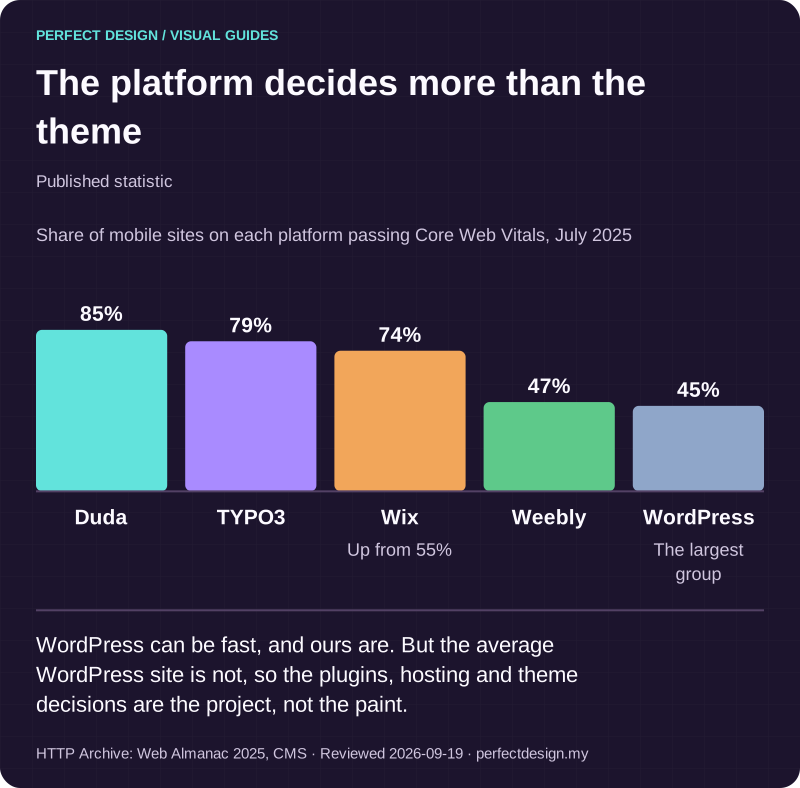
The platform decides more than the theme
Published statistic. WordPress can be fast, and ours are. But the average WordPress site is not, so the plugins, hosting and theme decisions are the project, not the paint.
Source: HTTP Archive: Web Almanac 2025, CMS. Reviewed .
Read the graphic as text
- Duda: 85%.
- TYPO3: 79%.
- Wix: 74%. Up from 55%
- Weebly: 47%.
- WordPress: 45%. The largest group
Chart scale: Share of mobile sites on each platform passing Core Web Vitals, July 2025.
The content model, and who is allowed to change it
A content model is the list of content types the site must manage, the fields each one carries and how they relate: a service, a project story, a person, a location, and which connects to which. Agreeing it early is the cheapest work on the project. Retrofitting it after design sign-off is the most expensive, because every page already built has to be rebuilt to match.
Map editing tasks to permissions, not to seniority
Take Example Studio, a wholly fictional service business used here to make this concrete. It publishes service pages and project stories. WordPress documentation is helpful on how to think about access: a role is a set of tasks, called capabilities, and one role should not be treated as senior to another. Roles describe responsibilities. The defaults reflect that, for instance a contributor can write and manage their own posts but cannot publish them.
So separate the tasks before assigning anything: drafting content, publishing it, uploading media, editing templates and changing site settings are five permissions, not one job title. The Site Editor, which manages templates, styles and navigation, is available when a block theme is active, and what a person can do inside it depends on the capabilities their role holds. The documentation warns that the capability which opens it is not limited to it and may grant other theme-related administrative functions, and advises granting only the capabilities a role needs. Confirm the theme type and the intended editing tasks for your own project.
| Workflow step | Assumed actor | Proposed system response | Exception | Acceptance evidence to collect |
|---|---|---|---|---|
| Draft a change to a service page | Content editor | Save an unpublished draft and preview the title, copy and enquiry link | Approved service facts are missing, so the draft stays unpublished | The saved preview and a checklist of the outstanding facts |
| Review and publish | Publication reviewer | Check the approved facts and publishing permission, then publish if agreed | An unauthorised editor must not be able to publish, and wrong scope returns to editing | Permission-test observations and a record of who approved what |
| Check the visitor journey after the change | Technical owner, then a visitor | Walk the agreed service page and enquiry path, recording the live version | A broken link or a failed form triggers investigation and an agreed recovery decision | Link and form test records with version information, no passing result assumed |

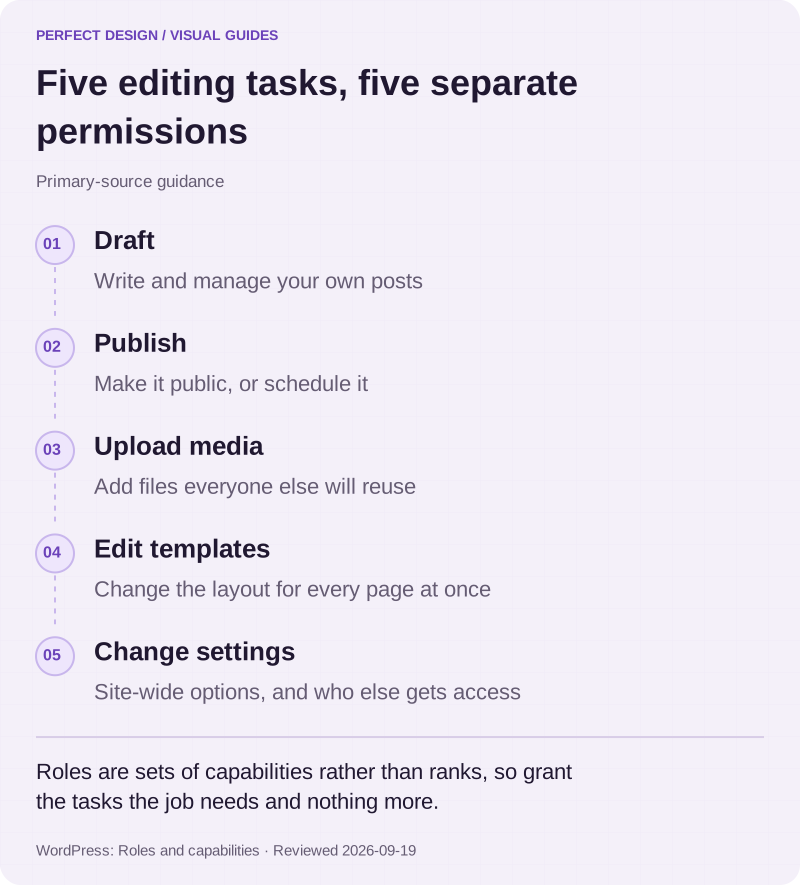
Five editing tasks, five separate permissions
Primary-source guidance. Roles are sets of capabilities rather than ranks, so grant the tasks the job needs and nothing more.
Source: WordPress: Roles and capabilities. Reviewed .
Read the graphic as text
- Draft. Write and manage your own posts
- Publish. Make it public, or schedule it
- Upload media. Add files everyone else will reuse
- Edit templates. Change the layout for every page at once
- Change settings. Site-wide options, and who else gets access
Collect the content patterns and editing constraints first
Before comparing approaches, write down what the site has to carry. Which patterns repeat, such as service pages, project stories, people and news, and which are exceptional, such as a campaign page. What editors must be able to add, revise, preview and publish without help. And which parts stay controlled: layout regions, navigation, brand type and colour, and the fields holding structured facts. Then record the acceptance constraints: behaviour on the screen sizes your visitors use, an accessibility review, a performance expectation, and what must keep working after an update.
When to compare a theme against custom components
That comparison is decided on content fit, where the editing boundaries sit, how many patterns genuinely repeat, what accessibility and performance review finds, what an upgrade would disturb and who owns the result. The practical rule is that editable fields, their exceptions and the evidence you will accept are defined before development, not discovered during it. The deeper theme-versus-components guide is still to be published here.
Extensions: what to take from a plugin and what to build
Sort every requested function into one of four buckets: content behaviour the platform already has, configuration of an extension, an integration with a system you run, or custom work. Evaluate anything in the middle two on the same fields each time. What it is for, what data it touches and where that goes, what permissions it needs, what happens when it fails, whether it ties you to somebody else's update cycle, who owns the licence, and what replacing it would involve. That is a method, not a shopping list.

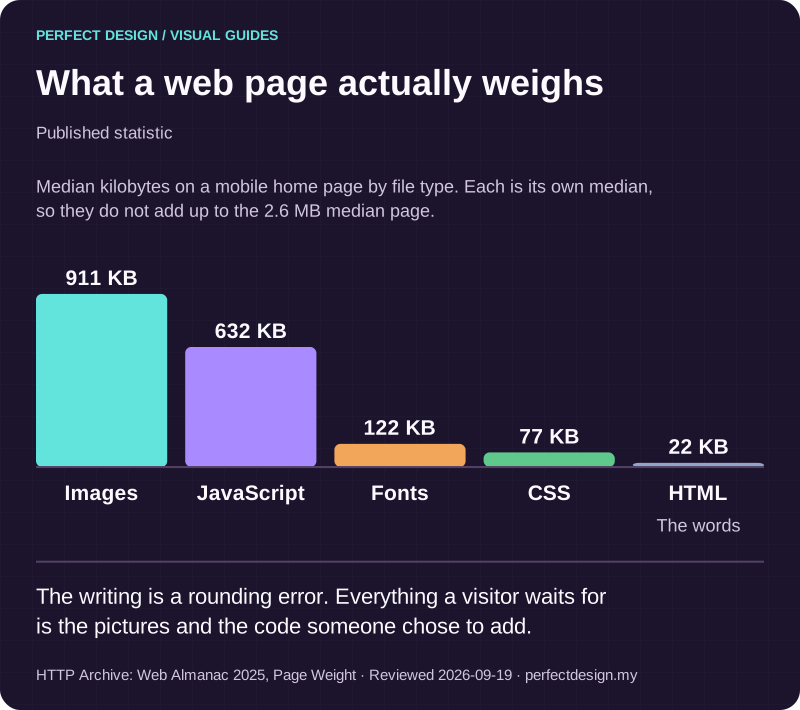
What a web page actually weighs
Published statistic. The writing is a rounding error. Everything a visitor waits for is the pictures and the code someone chose to add.
Source: HTTP Archive: Web Almanac 2025, Page Weight. Reviewed .
Read the graphic as text
- Images: 911 KB.
- JavaScript: 632 KB.
- Fonts: 122 KB.
- CSS: 77 KB.
- HTML: 22 KB. The words
Chart scale: Median kilobytes on a mobile home page by file type. Each is its own median, so they do not add up to the 2.6 MB median page..
Updates, backups and the day something breaks
WordPress documentation is direct about this. An update affects all the files and folders in the main installation, including the core files, so modifications made to those files will be lost. It advises backing up first so the site can be restored if there are problems. That is documented platform behaviour, not a maintenance policy. The policy is yours to agree: who runs updates, on what schedule, where the backup lives, how far back it reaches, and who is called when a page stops working.
Agree the operating sequence before launch
The sequence is the same every time. Inventory what is installed and which versions are in play. Take a backup. Make the change somewhere that is not the live site. Check the agreed journeys afterwards, which usually means a key page loads, images resolve, the form submits and the enquiry arrives. Then keep the change or roll it back, and record what changed, when and by whom. Example Studio's third row is that in miniature: a broken link or a failed form triggers investigation and an agreed recovery decision, not a note to look at it later.
Handover, and the exit you should plan for on day one
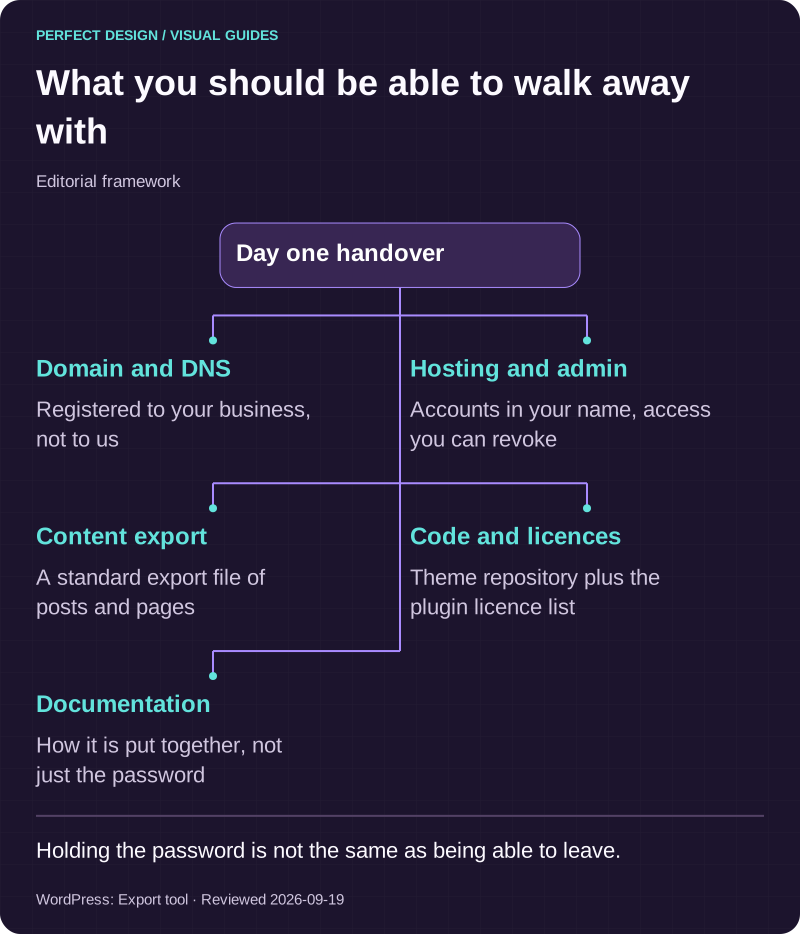
Agree who holds what, in writing, before it matters: the domain and DNS, the hosting account, WordPress administration, the content, the theme and component code in a repository you control, the plugin and licence inventory, analytics, backups, documentation and support contacts. Access transfer and documentation are separate acceptance items. Holding the password is not the same as knowing how the site is put together.
Classify future work up front: routine content changes, maintenance updates, new features and migration are four conversations with four different costs. The approval and version records above are what a future handover, to your team or another provider, is built on. Migration itself, meaning the page inventory, the redirects that preserve those pages and the rollback plan, is its own scoping decision.

What you should be able to walk away with
Editorial framework. Holding the password is not the same as being able to leave.
Basis: WordPress: Export tool. Reviewed .
Read the graphic as text
Day one handover
- Domain and DNS. Registered to your business, not to us
- Hosting and admin. Accounts in your name, access you can revoke
- Content export. A standard export file of posts and pages
- Code and licences. Theme repository plus the plugin licence list
- Documentation. How it is put together, not just the password
What to bring to the conversation
Bring your current website or starting point, the business problem, who it affects, the tools you already use and any real constraint. The decisions worth clarifying before a scope is agreed are the five above: content ownership, the functions genuinely required, who edits and who publishes, who runs updates, and what handover must contain. If you would like to work through them, tell us where you are now. Where WordPress is not the right answer, we will say so and explain what we would build instead.