What a learning-app scope has to make explicit
This page follows one workflow from enrolment to support, and names the decisions that have to be settled along the way. Three ideas do most of the work and are worth separating at the start. Entitlement is the rule that permits someone to open a piece of content. Progress is the learner's own state, which has to survive a closed app, a flat battery and a second device. Assessment is a versioned attempt with its own completion logic. Collapse those into a single record and every later question, from resuming a lesson to reissuing a certificate, becomes an argument.

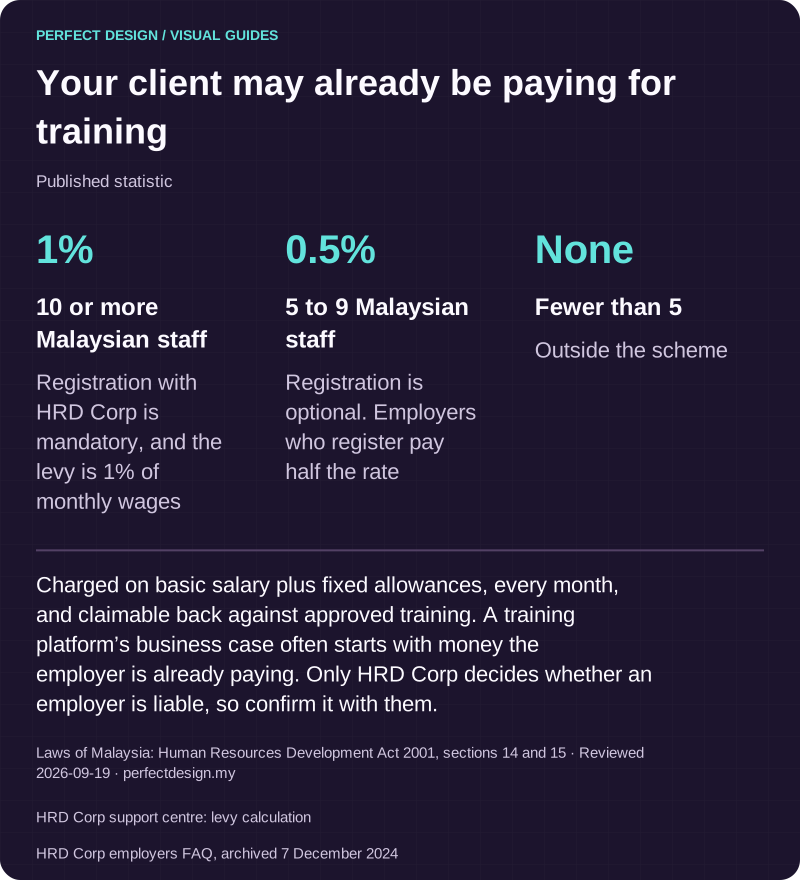
Your client may already be paying for training
Published statistic. Charged on basic salary plus fixed allowances, every month, and claimable back against approved training. A training platform’s business case often starts with money the employer is already paying. Only HRD Corp decides whether an employer is liable, so confirm it with them.
Source: Laws of Malaysia: Human Resources Development Act 2001, sections 14 and 15. Reviewed .
Also: HRD Corp support centre: levy calculation.
Also: HRD Corp employers FAQ, archived 7 December 2024.
Read the graphic as text
- 10 or more Malaysian staff: 1%. Registration with HRD Corp is mandatory, and the levy is 1% of monthly wages
- 5 to 9 Malaysian staff: 0.5%. Registration is optional. Employers who register pay half the rate
- Fewer than 5: None. Outside the scheme
Which learner, instructor and administrator tasks are required
Learner tasks are the obvious half: enrol or be assigned, open a lesson, resume where they stopped, submit an assessment, and see what is left. Each of those needs a normal path and an exception path. What happens when a learner changes phone halfway through a course, when access is withdrawn because an employer contract ended, or when they want to retake an assessment they have already passed. Those three questions decide more of the build than the lesson layout does.
Instructors and course owners need a different set: add or replace content, decide when a change becomes visible, review submitted attempts, and make the completion decision where it is not automatic. Publishing is worth pinning down early. Odoo's eLearning documentation, read on 18 September 2026, treats publishing a course and publishing an individual piece of content as separate states, which is a sensible shape to borrow even though it describes one vendor's product rather than a universal rule.
Administrators own access, permissions, support and integrations: who may enrol whom, who resolves an access dispute, who owns the connection to whatever holds your staff or customer records. Name those people before the build. An unowned exception queue is how a training programme quietly stops being trusted.
Content, progress, assessment and certificates are four different records
Structure the content first, because the progress record is shaped by it. Decide the hierarchy, meaning course, section, lesson and whatever sits below that, and decide what counts as the unit of progress. Marking a lesson complete is not the same as watching it, and both are different from passing the assessment attached to it. Decide which of those you actually want to record, because each one carries its own storage, sync and reporting cost.
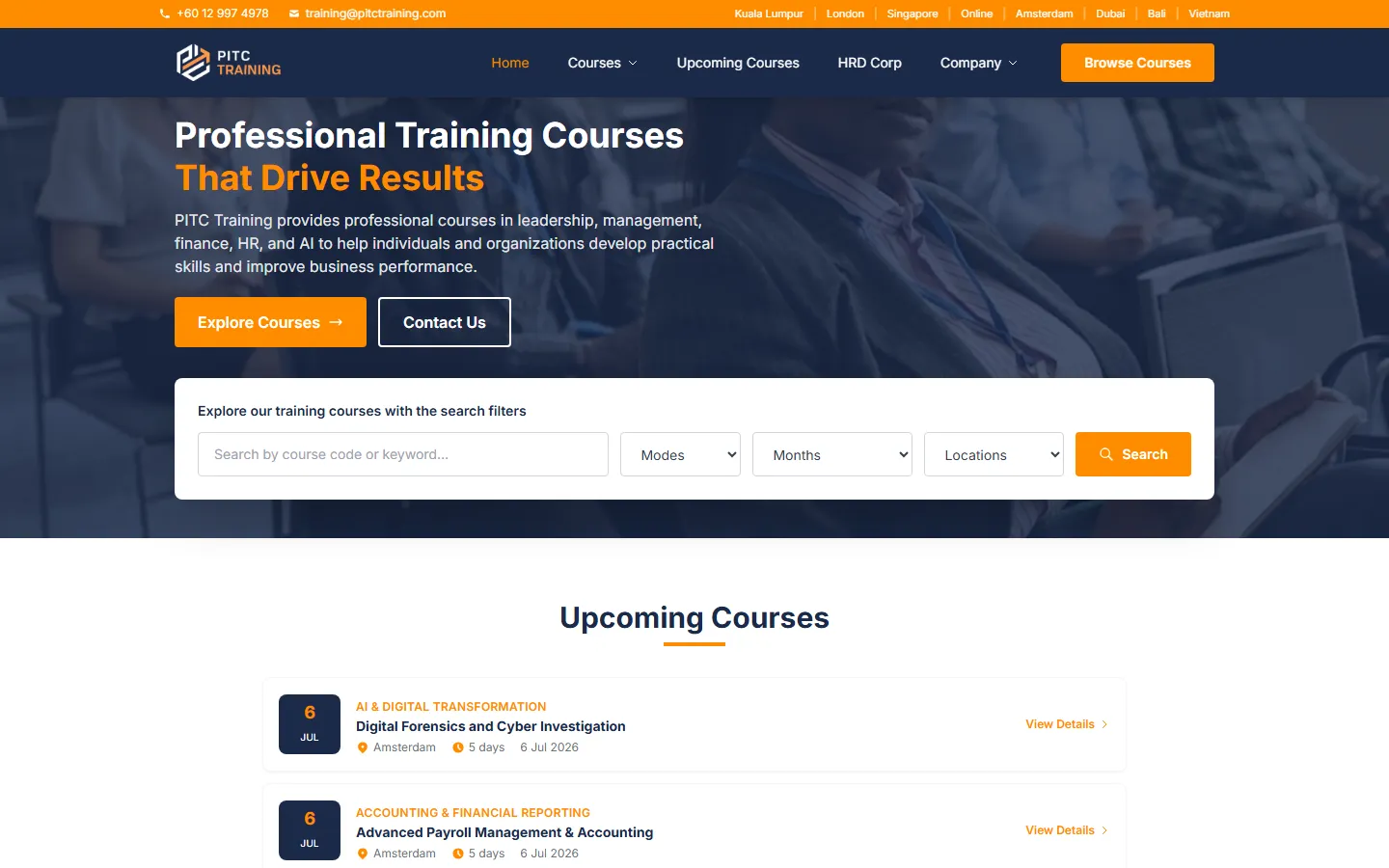
Versioning is the part people forget. When a lesson is replaced, does a learner halfway through keep the version they started, or move to the new one and lose their place. Our PITC Training work is a real client engagement rather than a prototype: a course catalogue with per-venue sessions, registration and brochure flows that capture every enquiry into Zoho CRM, and a custom admin console behind it. It runs as a web platform, not a store-published app. Nothing we have built is published on the App Store or Google Play yet.
| Workflow step | Assumed actor | Proposed system response | Exception | Acceptance evidence to collect |
|---|---|---|---|---|
| Open an assigned lesson | Learner | Serve the permitted version of the course content | An expired entitlement or an unavailable download shows an accurate state | Entitlement and download observations, including the expired case |
| Resume learning offline | Learner | Save the scoped progress locally and sync when a connection returns | Conflicting progress from a second device needs an agreed merge rule | Offline, reconnect and conflict tests |
| Submit the assessment | Learner and course owner | Record a versioned attempt and apply the stated completion rule | An interrupted or repeated submission stays reconcilable | Attempt, completion and retry observations |
Where learning design takes over
How a course is broken up, what a learner should be able to do at the end of each unit, and how feedback is worded are learning-design decisions, not software ones. They still have to be made before the content states and assessment records are finalised, because a course written as one long video needs a different progress model from one built as short units with a check at the end of each.
Purchase, enrolment and access
Course identity, enrolment, entitlement and withdrawal are four separate decisions, and paying for something is only one route into them. Odoo's eLearning documentation describes enrolment policies that are open to anyone who can see the course, restricted to invited people, or granted on payment, along with prerequisites and visibility options. That is a vendor example rather than your policy, but it is a useful checklist of the access rules a scope has to answer.

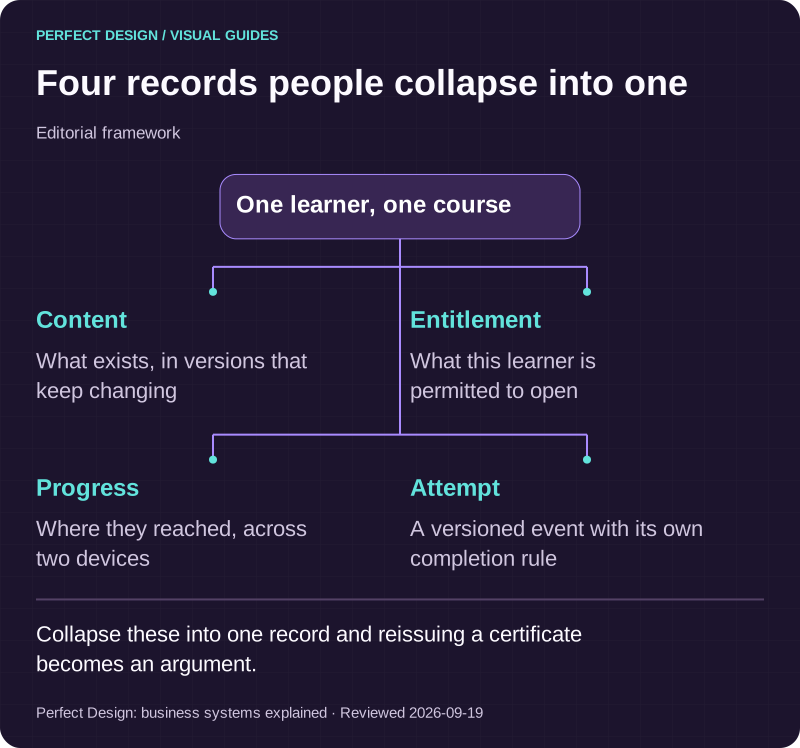
Four records people collapse into one
Editorial framework. Collapse these into one record and reissuing a certificate becomes an argument.
Basis: Perfect Design: business systems explained. Reviewed .
Read the graphic as text
One learner, one course
- Content. What exists, in versions that keep changing
- Entitlement. What this learner is permitted to open
- Progress. Where they reached, across two devices
- Attempt. A versioned event with its own completion rule
Offline lessons and the systems behind the course list
Decide which activities need to work with no connection and which may wait. Downloading a lesson for a commute is a common requirement and a reasonable one. Recording that the lesson was completed is a different matter, because the record has to reach a server that is authoritative for progress. So the app needs a visible state: downloaded, pending, synced or in conflict. A learner who cannot tell whether their work was saved will redo it, and then you have two attempts to reconcile.
On integrations, the questions are ownership questions. Which system holds identity, which holds the course catalogue, which records enrolment, which is authoritative for an assessment result, and who receives reporting. Then the four practical tests: whether an interface exists, who can grant access, whether the data is clean enough to rely on, and what the vendor terms allow. Confirm those before they enter a scope, not after.
Notifications worth sending to a learner
Keep the list short and event-based: a course assigned, new content added, a deadline approaching, a completion recorded, a support reply. Odoo's documentation describes separate notification options for new content and for course completion, which is a reasonable split. Decide permission timing and learner preferences, and decide what the learner sees in the app when a message never arrives.

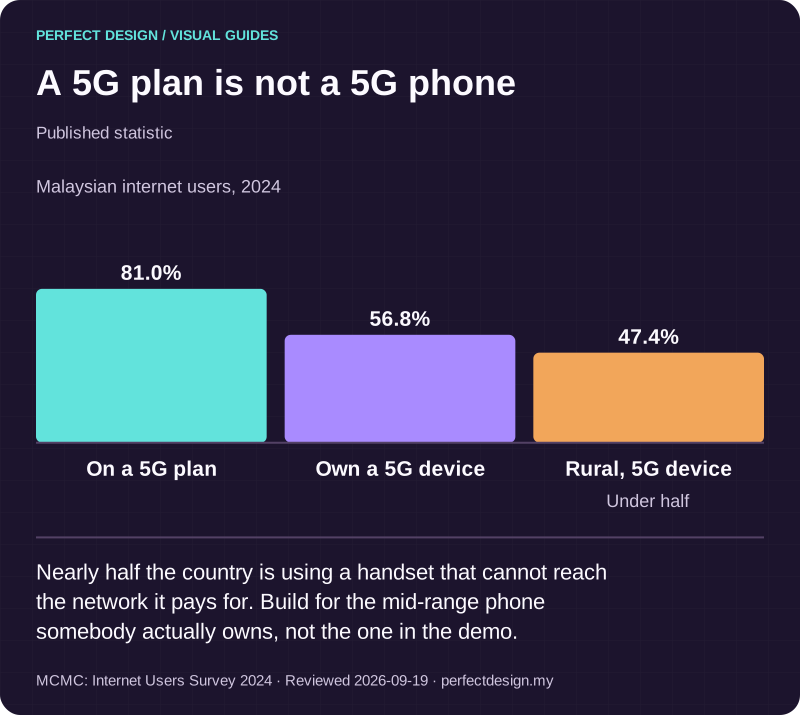
A 5G plan is not a 5G phone
Published statistic. Nearly half the country is using a handset that cannot reach the network it pays for. Build for the mid-range phone somebody actually owns, not the one in the demo.
Source: MCMC: Internet Users Survey 2024. Reviewed .
Read the graphic as text
- On a 5G plan: 81.0%.
- Own a 5G device: 56.8%.
- Rural, 5G device: 47.4%. Under half
Chart scale: Malaysian internet users, 2024.
Assessment integrity, and what a certificate actually says
Integrity is a scoping decision with a cost, so decide how much you need. Recording each attempt with its timestamp, the content version and the answers given is the baseline, and it is enough for most internal training. Beyond that sit question pools, time limits, single-attempt rules, restricted retakes and identity checks at submission, each adding build and support work. Be honest about what an app can and cannot enforce: it can make an attempt attributable and auditable, and it cannot see who is holding the phone.
A certificate is a piece of completion evidence, and it says exactly what your completion rule says and nothing more. Decide what triggers it, whether it expires, whether it can be revoked, how it is verified by a third party, and who reissues it when someone loses theirs. Accreditation is separate and is awarded by an accrediting body, not by the software.
Accessibility and language
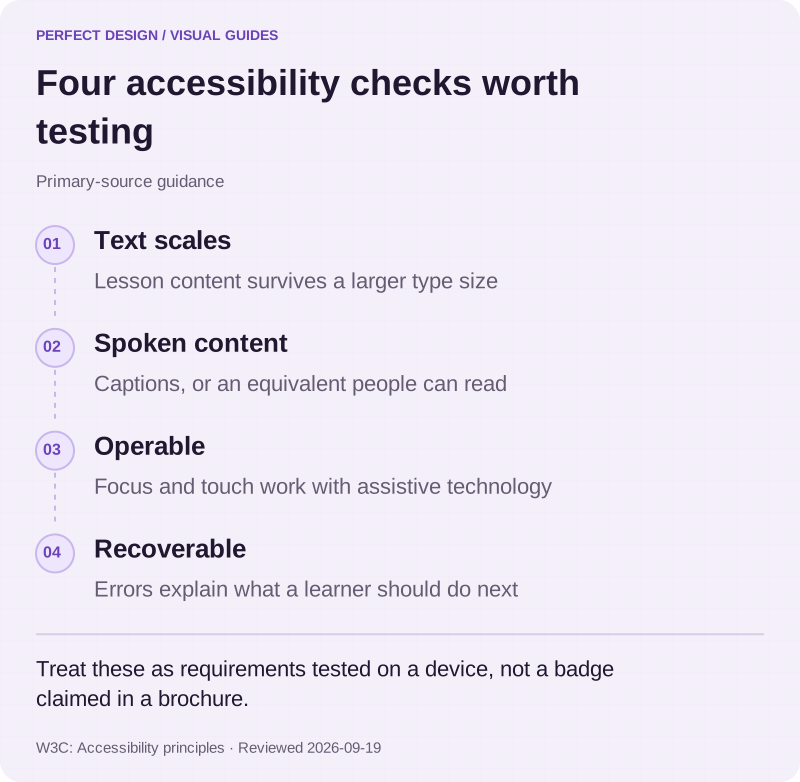
Treat both as requirements to test rather than badges to claim. Readable lesson content, captions or an alternative for anything spoken, text that scales when a learner enlarges it, focus and touch behaviour that works with assistive technology, clear feedback and errors a learner can recover from. On language, the decisions are ownership decisions: who writes and approves each translation, how the layout copes when translated text runs longer, how dates and numbers are formatted, and how a second language stays current when the first one changes.

Four accessibility checks worth testing
Primary-source guidance. Treat these as requirements tested on a device, not a badge claimed in a brochure.
Source: W3C: Accessibility principles. Reviewed .
Read the graphic as text
- Text scales. Lesson content survives a larger type size
- Spoken content. Captions, or an equivalent people can read
- Operable. Focus and touch work with assistive technology
- Recoverable. Errors explain what a learner should do next
An app, or a full learning platform
They are different purchases. A learning app is a way for people to consume content and record progress on a phone. A full learning platform is the administration behind it: authoring, cohorts, scheduling, reporting, compliance records and integrations with whatever holds your staff data. If the content changes rarely, the audience is small and reporting means a monthly spreadsheet, the app is the cheaper and better answer. If administration is the real workload, buying or building that first makes more sense, and an app on top of it is a later phase.

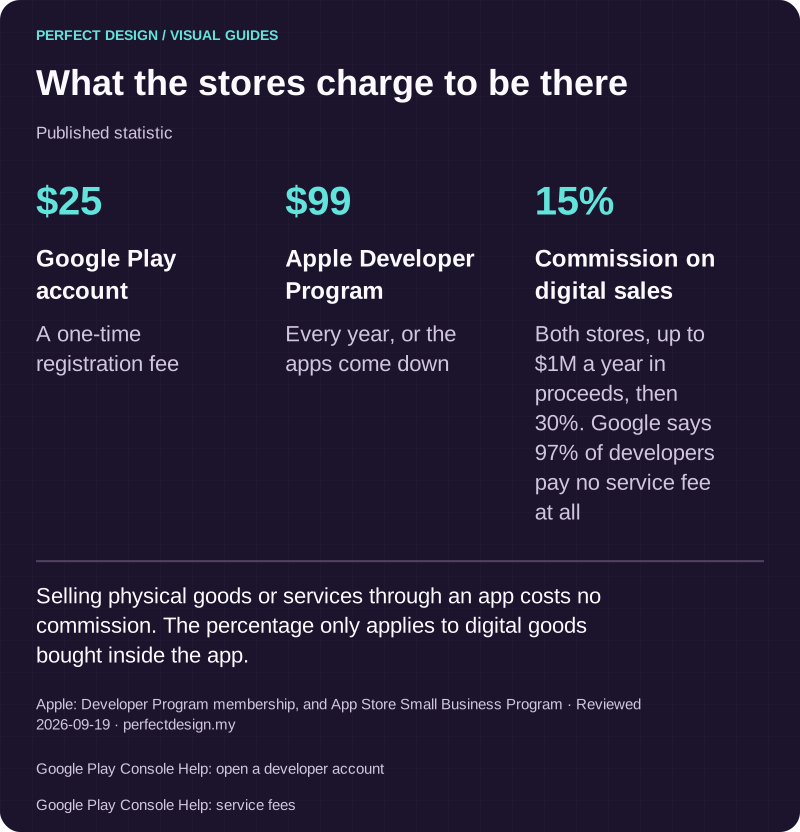
What the stores charge to be there
Published statistic. Selling physical goods or services through an app costs no commission. The percentage only applies to digital goods bought inside the app.
Source: Apple: Developer Program membership, and App Store Small Business Program. Reviewed .
Also: Google Play Console Help: open a developer account.
Also: Google Play Console Help: service fees.
Read the graphic as text
- Google Play account: $25. A one-time registration fee
- Apple Developer Program: $99. Every year, or the apps come down
- Commission on digital sales: 15%. Both stores, up to $1M a year in proceeds, then 30%. Google says 97% of developers pay no service fee at all
Turning this into a scoped project
Capture the decisions in one place: roles, the content and assessment model, entitlement and progress rules, what must work offline, notifications, integrations, accessibility, language and the acceptance evidence you expect. You do not need all of it settled. A clear current problem, the people affected, the tools you use today and any constraint you already know about make the first conversation useful. Bring that as a scoped enquiry, or compare this with the broader decision on mobile app development if you are still weighing an app against a website.