Start with one workflow, not a bot
The version of this project that works is narrow. Pick one event that already happens, decide what the customer should receive when it happens, decide what your team should see, and record the outcome somewhere you can check later. An enquiry arriving. A booking confirmed. A payment received. A delivery on its way. One event, one bounded conversation, one record.
That is a different purchase from a chatbot. The bot is a component; the workflow is the thing being built. Before anything is written, a scope needs seven items settled: the channel boundary, the trigger, the message category, the consent state, the system action, the exception route, and the name of the person who owns what happens when it goes wrong. Those decide the cost and the risk far more than the conversation design does.

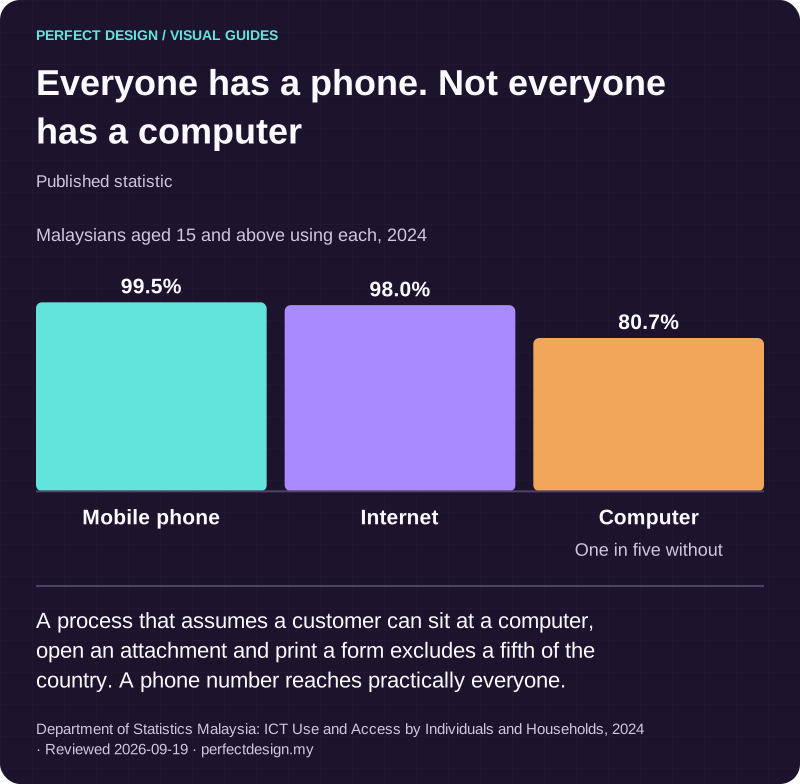
Everyone has a phone. Not everyone has a computer
Published statistic. A process that assumes a customer can sit at a computer, open an attachment and print a form excludes a fifth of the country. A phone number reaches practically everyone.
Source: Department of Statistics Malaysia: ICT Use and Access by Individuals and Households, 2024. Reviewed .
Read the graphic as text
- Mobile phone: 99.5%.
- Internet: 98.0%.
- Computer: 80.7%. One in five without
Chart scale: Malaysians aged 15 and above using each, 2024.
The account is yours, and it changes the plan
The account sits on your side of the line. Your business registers for its own access to the official WhatsApp Business API and the number belongs to you, and we build the workflow and connect it on top. That is not a technicality. The number, the message templates and their approval status, and the conversation history all sit in your account, which means registration and business verification are real items on the schedule rather than something a developer quietly handles in the background.
Plan for them. Verification asks for business details that have to match your records, the number you choose is awkward to change afterwards, and a number already in use on the consumer WhatsApp app has to be migrated rather than casually reused. We are building our own WhatsApp product to remove that setup step. It is in development and not available yet, so every project we scope today is built on your own Business API access.

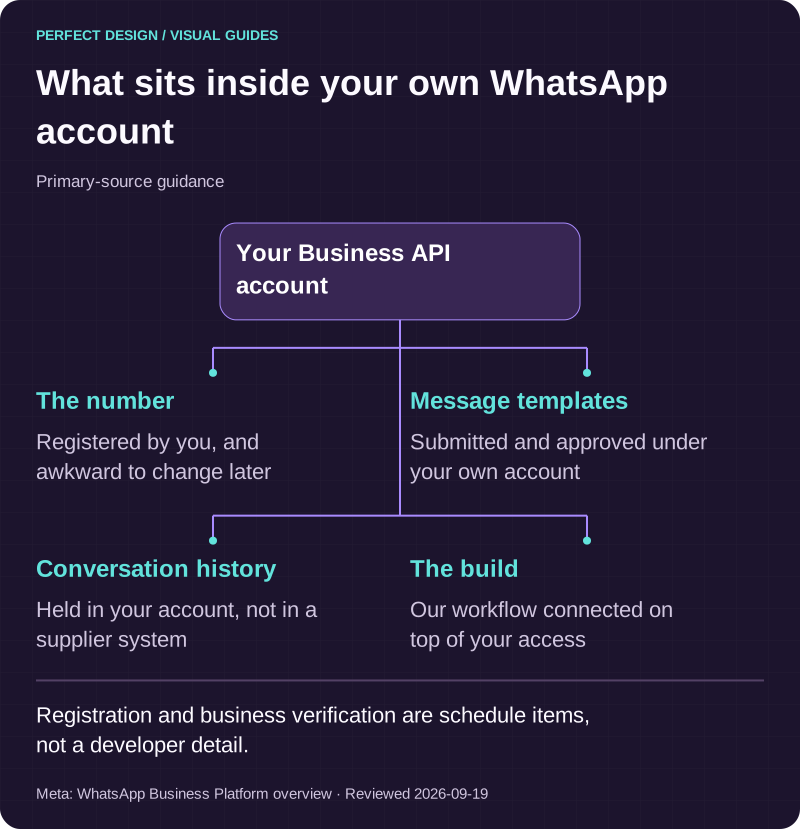
What sits inside your own WhatsApp account
Primary-source guidance. Registration and business verification are schedule items, not a developer detail.
Source: Meta: WhatsApp Business Platform overview. Reviewed .
Read the graphic as text
Your Business API account
- The number. Registered by you, and awkward to change later
- Message templates. Submitted and approved under your own account
- Conversation history. Held in your account, not in a supplier system
- The build. Our workflow connected on top of your access
Three kinds of message, and the rules that follow
Automated messages fall into three planning categories, and the category decides what you may send and when. Transactional updates confirm something the customer already asked for, such as a booking or a delivery. Support replies answer a person who has just written to you. Promotional messages are marketing, and they carry the tightest controls. The real classification and the exact wording need your approval, because you are the one whose number carries the consequence.
The WhatsApp business messaging policy we read on the date recorded below requires a business to have the person's mobile number and their opt-in permission before contacting them, and requires opt-out requests to be respected. Treat that as a design input rather than a compliance footnote. Consent becomes a field on the customer record with evidence of how it was given, opt-out becomes an action that suppresses future sends immediately, and both need somewhere to live before a single message is scheduled.

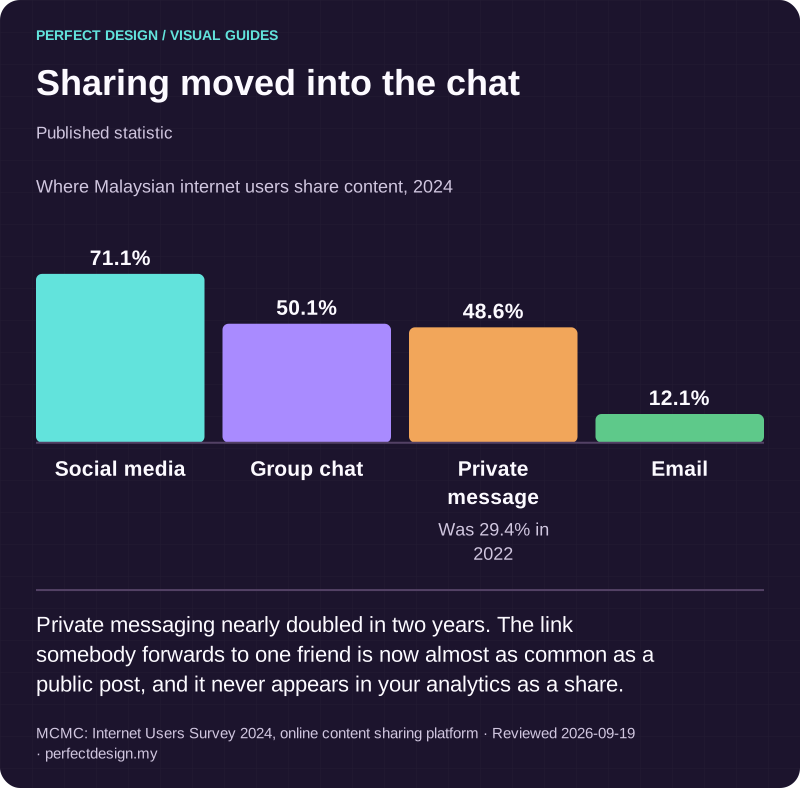
Sharing moved into the chat
Published statistic. Private messaging nearly doubled in two years. The link somebody forwards to one friend is now almost as common as a public post, and it never appears in your analytics as a share.
Source: MCMC: Internet Users Survey 2024, online content sharing platform. Reviewed .
Read the graphic as text
- Social media: 71.1%.
- Group chat: 50.1%.
- Private message: 48.6%. Was 29.4% in 2022
- Email: 12.1%.
Chart scale: Where Malaysian internet users share content, 2024.
Templates are a schedule item, not a formatting detail
A template is a pre-approved message structure with placeholders for the parts that vary. It is submitted under your account, reviewed, and either approved or rejected, and rejections are often about wording rather than intent. Nobody can promise you an approval or a turnaround, which is exactly why leaving templates until the week before launch is one of the more reliable ways to miss a date.
So we draft them early, in your voice, and keep the set small. Each template has a job, a category and a named owner who can edit it later without a developer. Variables stay limited to what genuinely varies, because a message stuffed with placeholders is harder to get approved and easier to break.

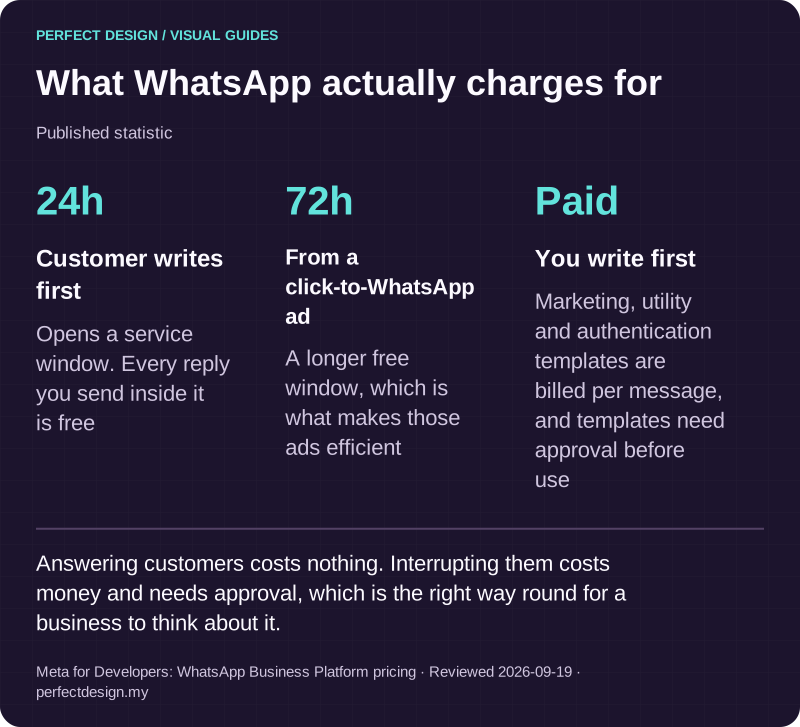
What WhatsApp actually charges for
Published statistic. Answering customers costs nothing. Interrupting them costs money and needs approval, which is the right way round for a business to think about it.
Source: Meta for Developers: WhatsApp Business Platform pricing. Reviewed .
Read the graphic as text
- Customer writes first: 24h. Opens a service window. Every reply you send inside it is free
- From a click-to-WhatsApp ad: 72h. A longer free window, which is what makes those ads efficient
- You write first: Paid. Marketing, utility and authentication templates are billed per message, and templates need approval before use
A worked example
The table below is a teaching example, not a client system. The roles and responses are assumed, and the acceptance evidence describes tests to run rather than results already obtained.
| Workflow step | Assumed actor | Proposed system response | Exception | Acceptance evidence to collect |
|---|---|---|---|---|
| Enquiry arrives and consent is identified | Prospective customer | Match the number to a customer record, read the consent state and open a service thread | No consent record exists, or the person opted out previously | Test that a suppressed number receives nothing and that the opt-out is visible on the record |
| Bounded reply and context capture | Automation | Answer within an agreed set of questions, collect the details the team needs and confirm what was understood | The question sits outside the agreed set, or the answer is ambiguous | Test that an out-of-scope question escalates instead of guessing, and compare the captured fields against the thread |
| Handover to a person | Service coordinator | Assign the thread with the request, the consent state, the workflow state, the attempted action and the reason it stopped | Nobody is on duty, or the assigned person does not respond within the agreed period | Test the reassignment rule and confirm the coordinator sees the context without opening a second system |
| Outcome recorded | Service coordinator | Write the result to the operational record, including anything promised to the customer | The message was delivered but the write to the record failed | Test that the failure is queued and visible to an owner, then compare the outcome with the thread |
What we would not automate
Some messages should be written by a person every time, and saying so early prevents an argument later. Money that is owed or disputed. Complaints, particularly the ones that arrive already angry. Anything medical, legal or safety related. Apologies. Prices that sit outside your normal rules. Identity documents and other sensitive details, which should not be collected in a chat thread at all. A broadcast to a purchased list belongs on the same list: it is not automation, and it is the quickest route to a reported number.
Handing the conversation over, properly
Every automated thread needs an exit, and the exit is where most of them fail. The customer should not have to repeat themselves, the reply should continue in the same thread rather than arriving from somewhere else, and the person taking over should arrive already informed.
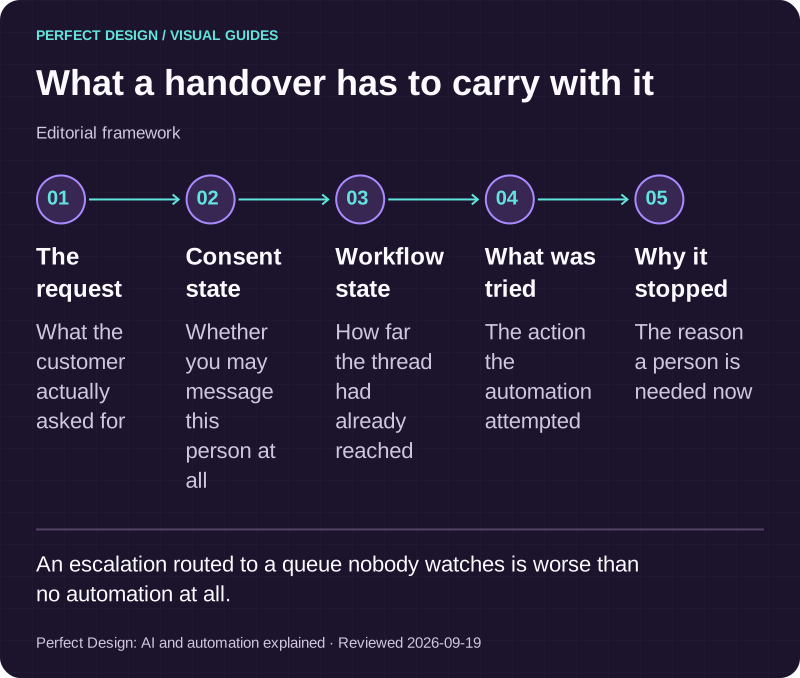
In practice the handover carries five things: what the customer asked for, their consent state, where the workflow had reached, what the automation attempted, and why it stopped. It also assumes somebody is on duty. An escalation routed to a queue nobody watches is worse than no automation at all, because the customer has already been told that help is coming.

What a handover has to carry with it
Editorial framework. An escalation routed to a queue nobody watches is worse than no automation at all.
Basis: Perfect Design: AI and automation explained. Reviewed .
Read the graphic as text
- The request. What the customer actually asked for
- Consent state. Whether you may message this person at all
- Workflow state. How far the thread had already reached
- What was tried. The action the automation attempted
- Why it stopped. The reason a person is needed now
Where the workflow connects
A WhatsApp workflow needs an operational destination, and that is a decision rather than a default. Which system holds the record, which fields map to which, who has permission to write to it, and where an exception goes when a write fails. Whether that destination is a CRM, a helpdesk or your own admin screens is agreed during scoping. Connecting it is covered on CRM and integrations, and the screen your team watches while the workflow runs is covered on admin dashboards.
What to verify before a scope is agreed
Policy and permitted messaging. The current policy version on the day you build, the message categories you intend to use, the evidence that consent was given, how an opt-out is actioned, the template conditions and the escalation requirement.
Account eligibility. The business portfolio, the phone number and how it is used today, who holds access, which permission each person needs, and the approval status of every template. These are values to confirm on your account, not capabilities to assume from documentation.
Technical integration. Authentication, where incoming events are routed, the connected system, the field mapping, how duplicates are handled and what happens to a request that fails.
Operational ownership. Who maintains the consent records, who edits message content, who holds account access, who actions an opt-out, who decides an escalation, and who rereads the policy next year. Anything still open is written down as to agree rather than being absorbed by whoever builds it.
What to bring
Bring the workflow you have in mind, the people it affects, the systems you already run, the change you want and the constraints that cannot move. Leave credentials out of a first message; there is a safe way to share access once there is something to build. Tell us the workflow and we will say what we would automate first, what we would leave to a person, and what has to be confirmed on your own account before anything is promised.