
Live client projectBrand site + dealer platform
Sentrix Auto
The website and dealer platform of a Malaysian PPF and car tint film brand: drivers choose a film and find an installer, owners check their warranty, and head office runs dealers, stock, orders and rewards in one system.
- Films, each with its own page
- 11
- Colours, each shown on the car
- 213
- Audiences on one platform
- 3
The brief
Sentrix Auto supplies paint protection film (PPF), car window tint and glass protection film to workshops across Malaysia. It needed more than a brand site: drivers had to choose a film and find an authorised installer, owners had to check their warranty without paperwork, and head office needed one system for its dealers, from each installation they register to the stock, orders and accounts behind them.
What we built
One platform on sentrixauto.com: a redesigned brand site with a page for every film, a 213-colour catalogue, comparisons and site search; a warranty check by phone number and car plate; an installer map; a dealer portal; and a head-office admin that tracks every roll of film, takes orders at each dealer’s tier price, sends them to SQL Account and runs dealer rewards. It went live in August 2026, and we have kept adding to it since.
- Client
- Sentrix Auto, a PPF and car tint film supplier
- Based in
- Puchong, Selangor, Malaysia
- Engagement
- July 2026 to now
- Our role
- Design, build, integration, hosting & care
- Built for
- Sentrix Auto’s head office, its authorised installers, and the drivers who buy its films.
- Live at
- sentrixauto.com
- Pages and screens (13)
- Home, Products and ranges, Film pages, Film comparison, Core Colour catalogue, Site search, Warranty check, Installer locator, FAQs and product care, News, For Business, Dealer portal, Head-office admin
01The brand site
A brand site redesigned in Sentrix’s own look.
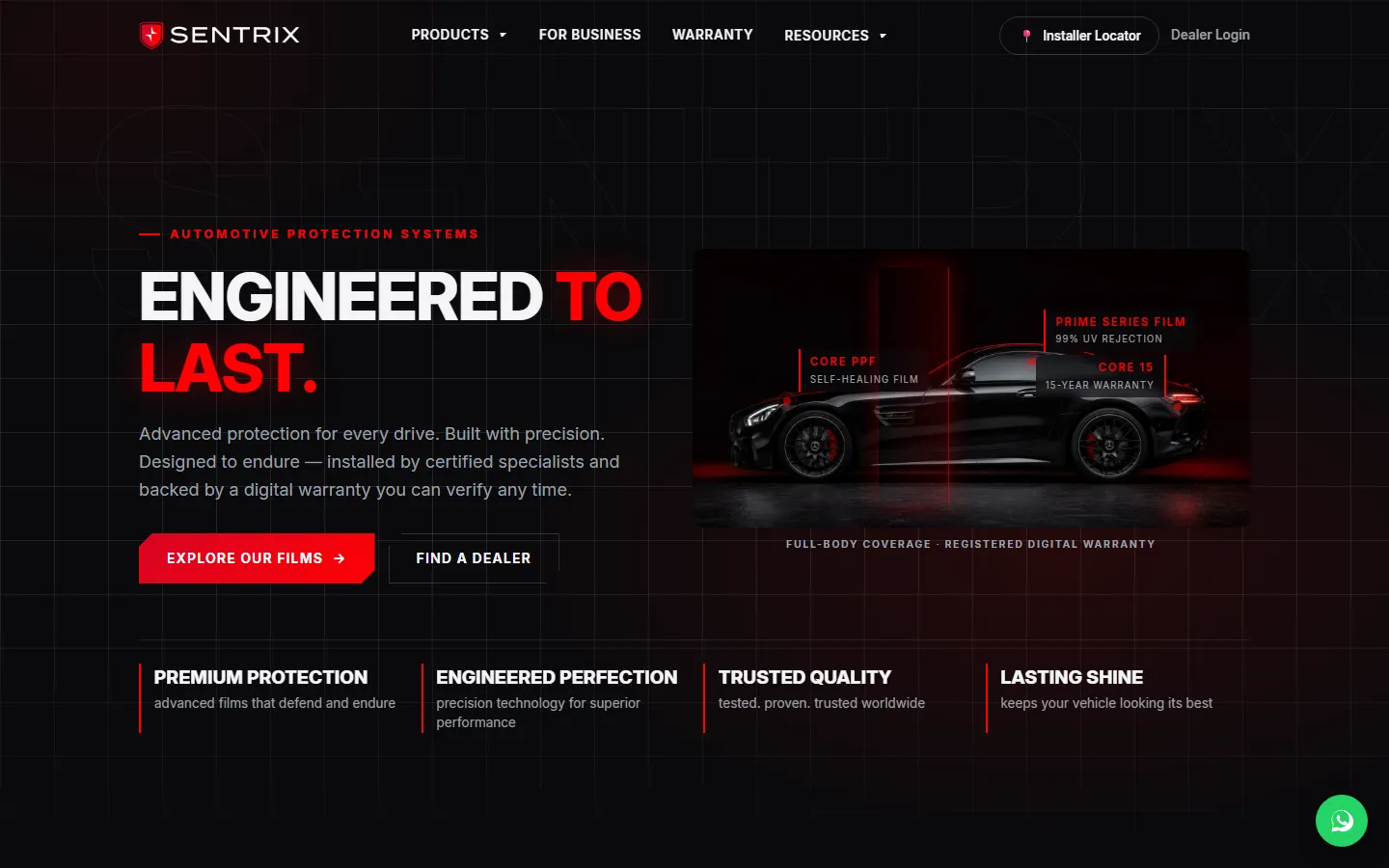
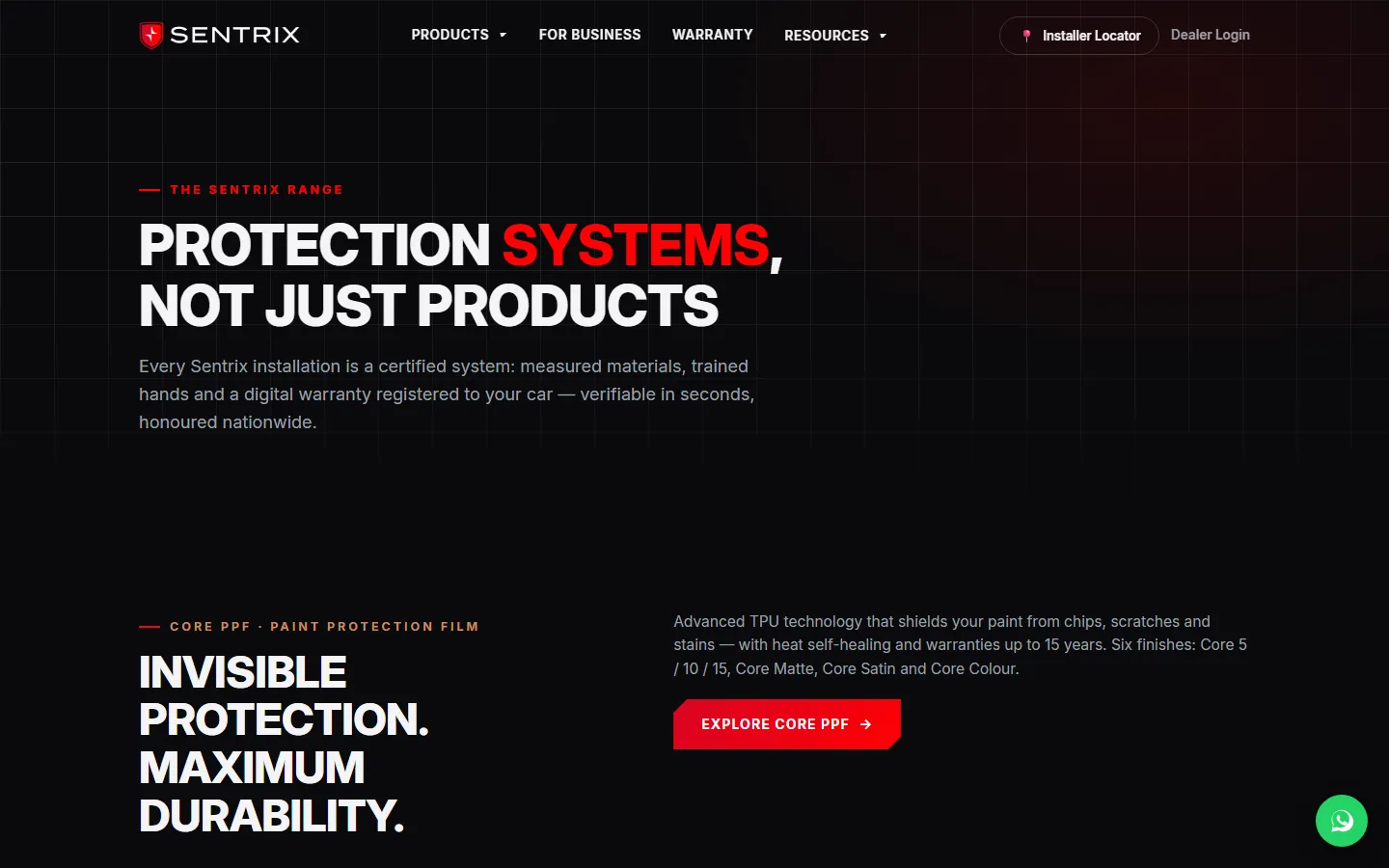
Sentrix Auto’s website went live in August 2026. At the end of October we redesigned every page from the brand’s own templates and photography: one header and footer, shared page sections and a look of its own for each range, with every page keeping its address and the headings it is found by.
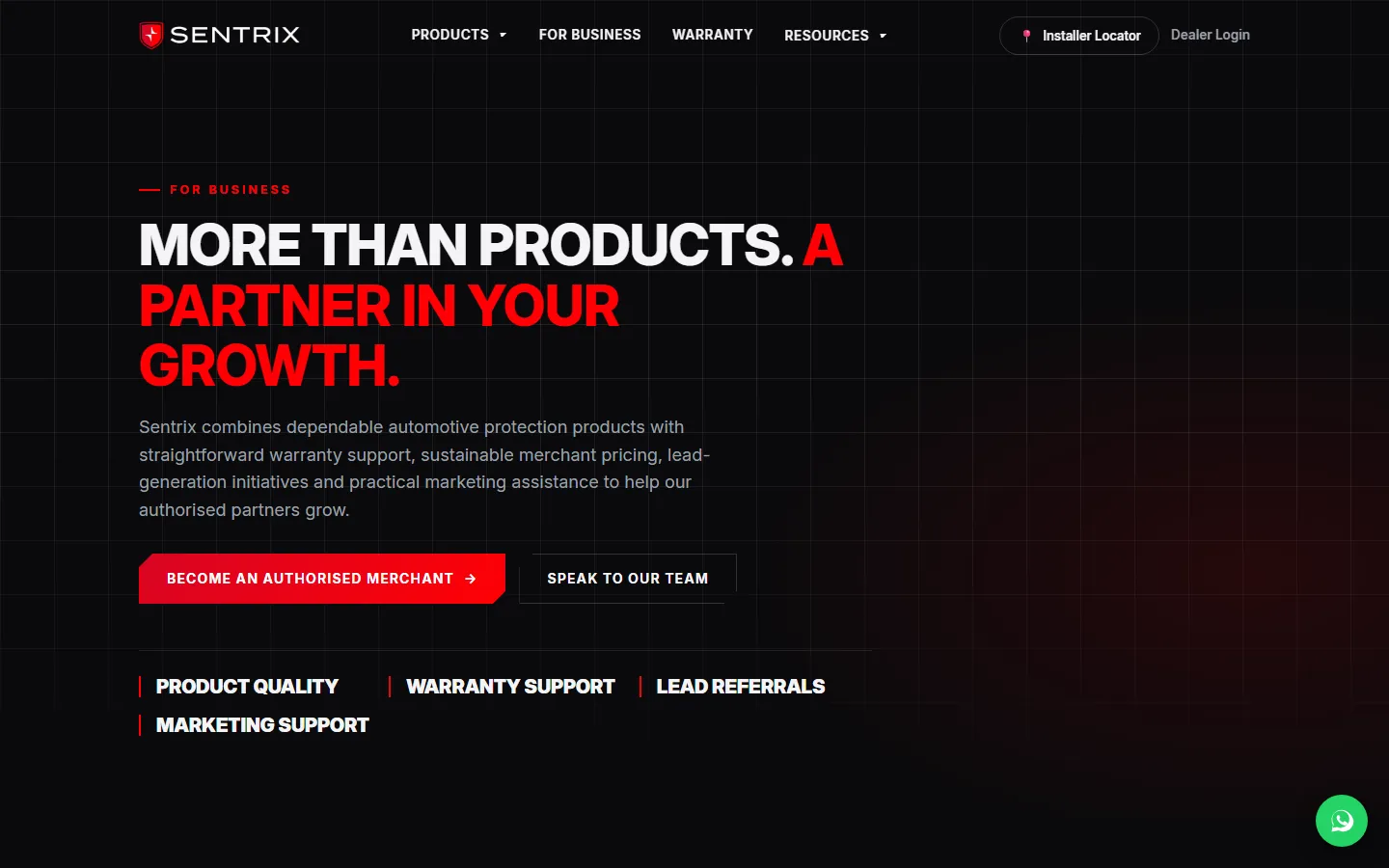
The home page says plainly what Sentrix is, a PPF and car tint film supplier in Malaysia, over Sentrix’s own video. Every page carries a heading in the words buyers search with, and boxes across the site hand drivers to the installer locator with their town and product already filled in.
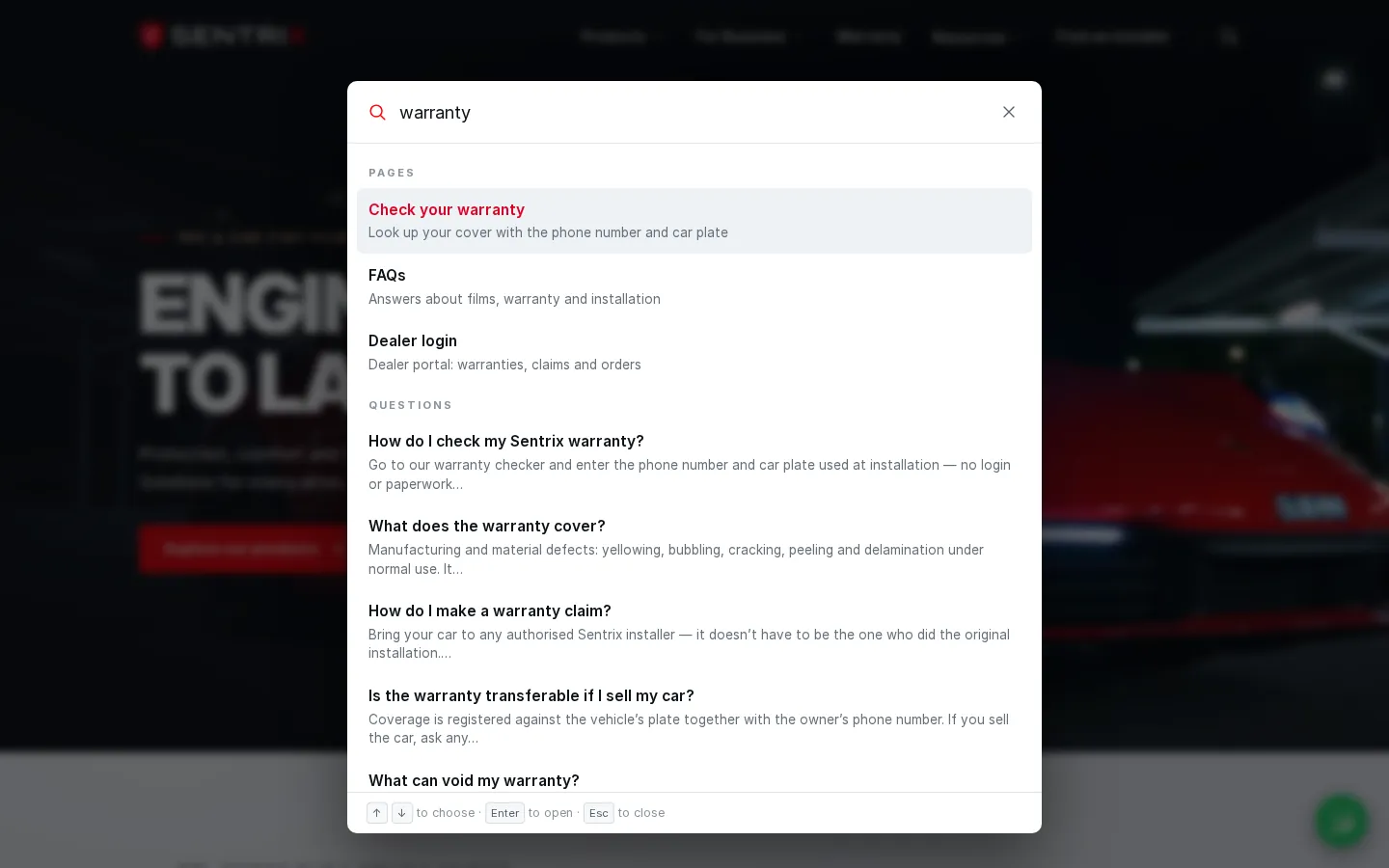
Site search opens from the header or with Ctrl K, and finds pages, films, FAQ answers and articles as you type. FAQs with their own search, product care, news and a newsletter sign-up complete the site.
02Films and specifications
Eleven films, each with a page of its own.
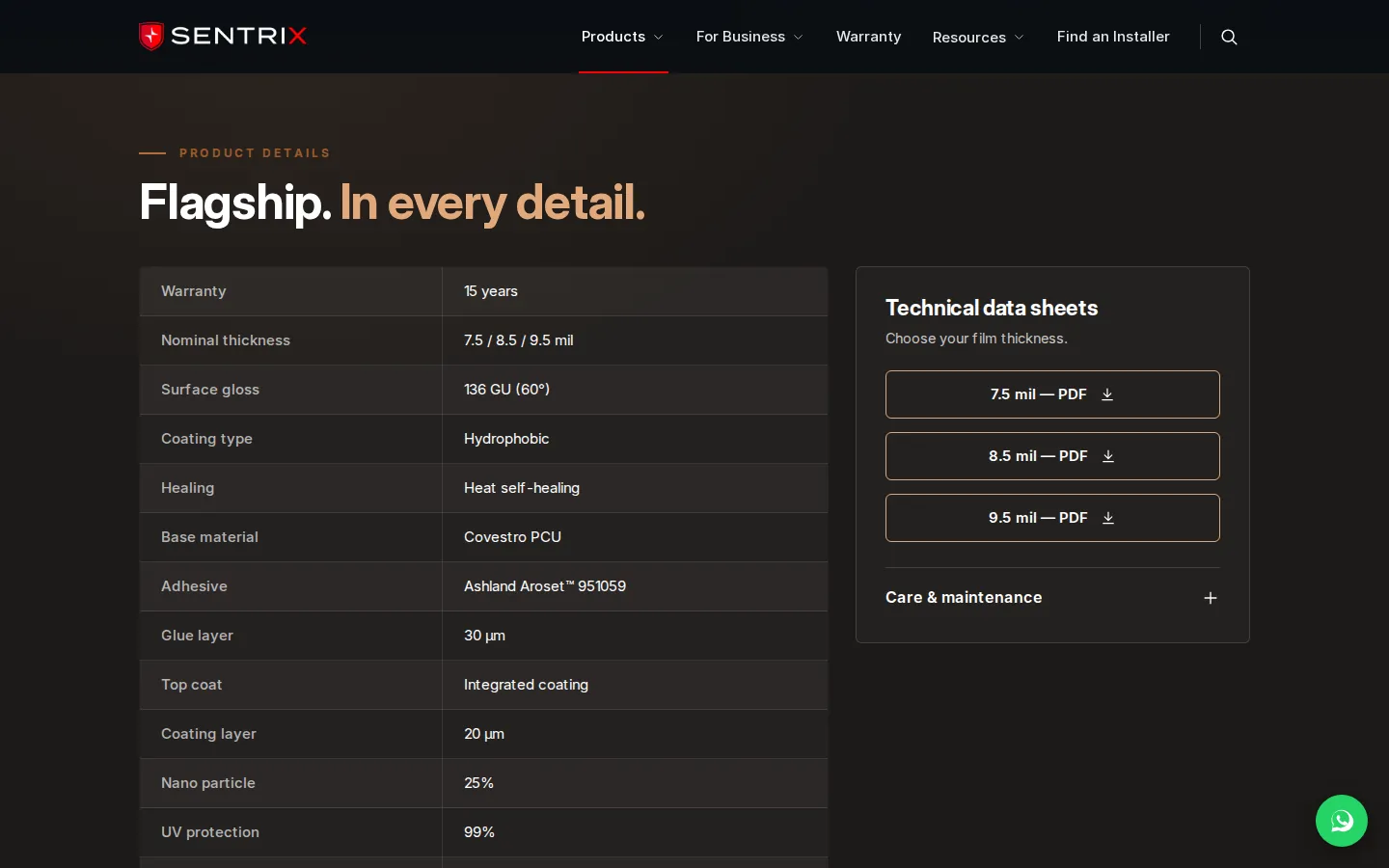
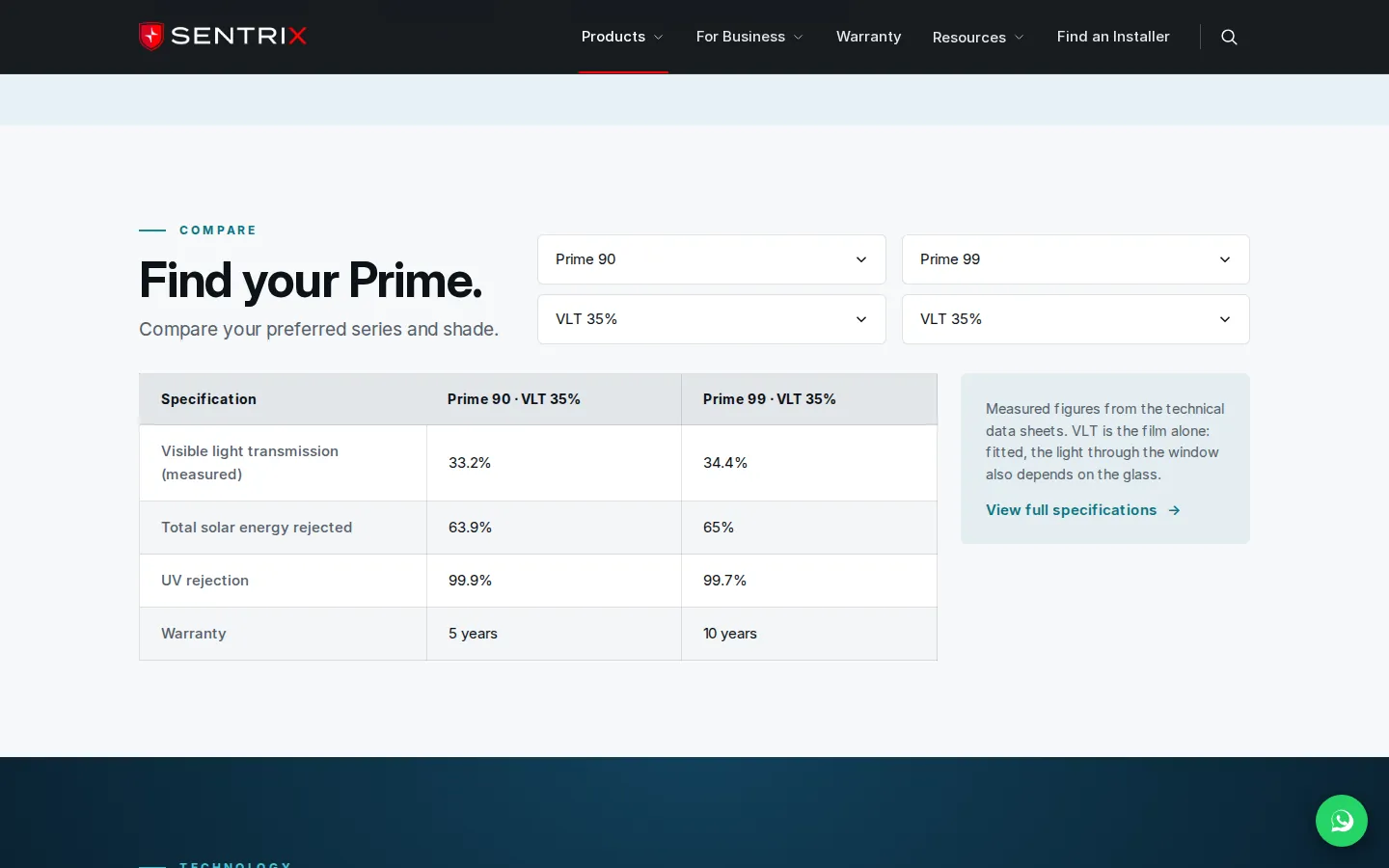
Each CORE paint protection film and PRIME window film has its own page: what the film is for, how it is built layer by layer, a full specification table, and its data sheets to download, one for each thickness or variant where a film has several. The figures in the page’s sections come from the same specification rows as the table, so the two always agree. CORE CRYSTAL, the glass protection film, has its own page too, with its specifications to follow.
A comparison puts any two PRIME films and shades side by side on measured light transmission, solar energy rejected, UV rejection and warranty, with the full specification a click away. CORE films compare the same way, straight from their range page.
Head office adds photos and data sheets to each film from its admin. A new film joins the warranty catalogue only once its warranty terms are confirmed, so an installer can never register cover that has not been set.
03Core Colour
213 colours, each shown on the car.
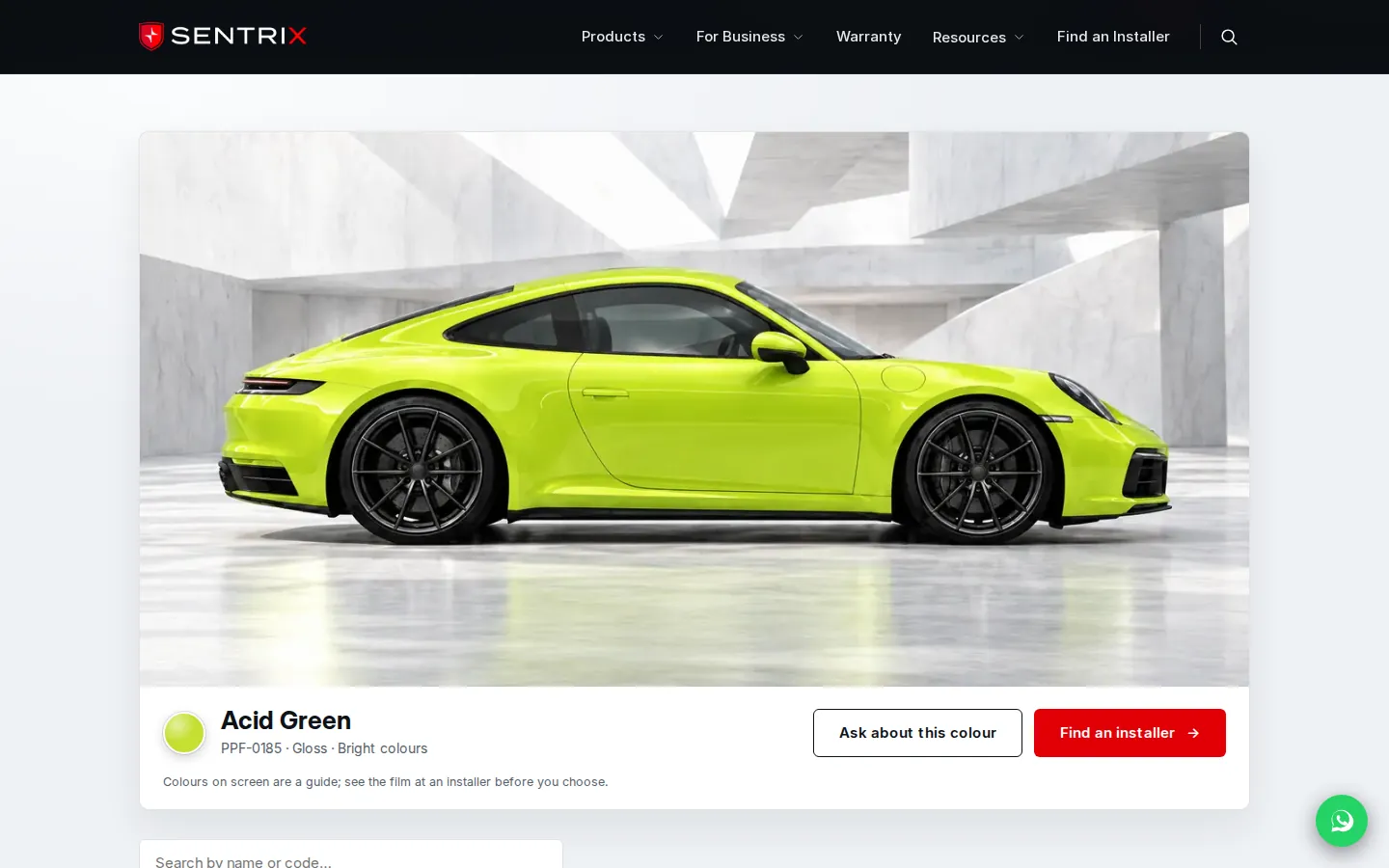
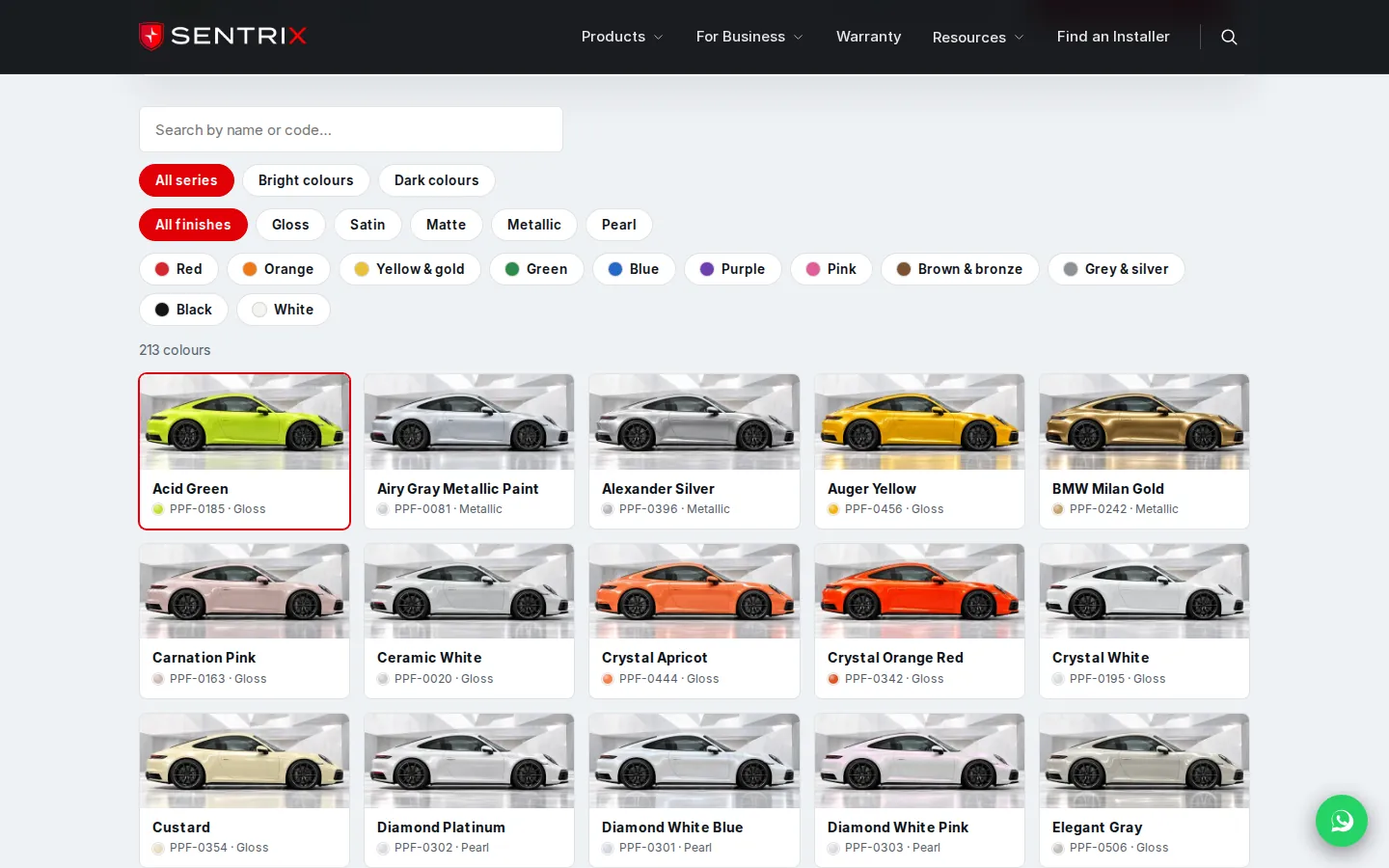
CORE COLOUR is paint protection film in colour: it changes a car’s colour and protects the paint at the same time. Its catalogue holds the 213 shades on Sentrix’s colour card, and we made a picture of the same car in every one of them from photos of the film samples, so drivers compare like with like.
Drivers filter by series, by colour family and by finish, from gloss and satin to matte, metallic and pearl, or search by name or code. Choosing a colour shows it on the car with its code and finish, with buttons to ask about it or find an installer.
Head office imports the colour list from a spreadsheet, edits or hides a colour, and switches the page on or off. A colour added before its picture exists is painted onto the car in the browser, so the catalogue is never missing one.
04Warranty check
A warranty owners check with a phone number and a plate.
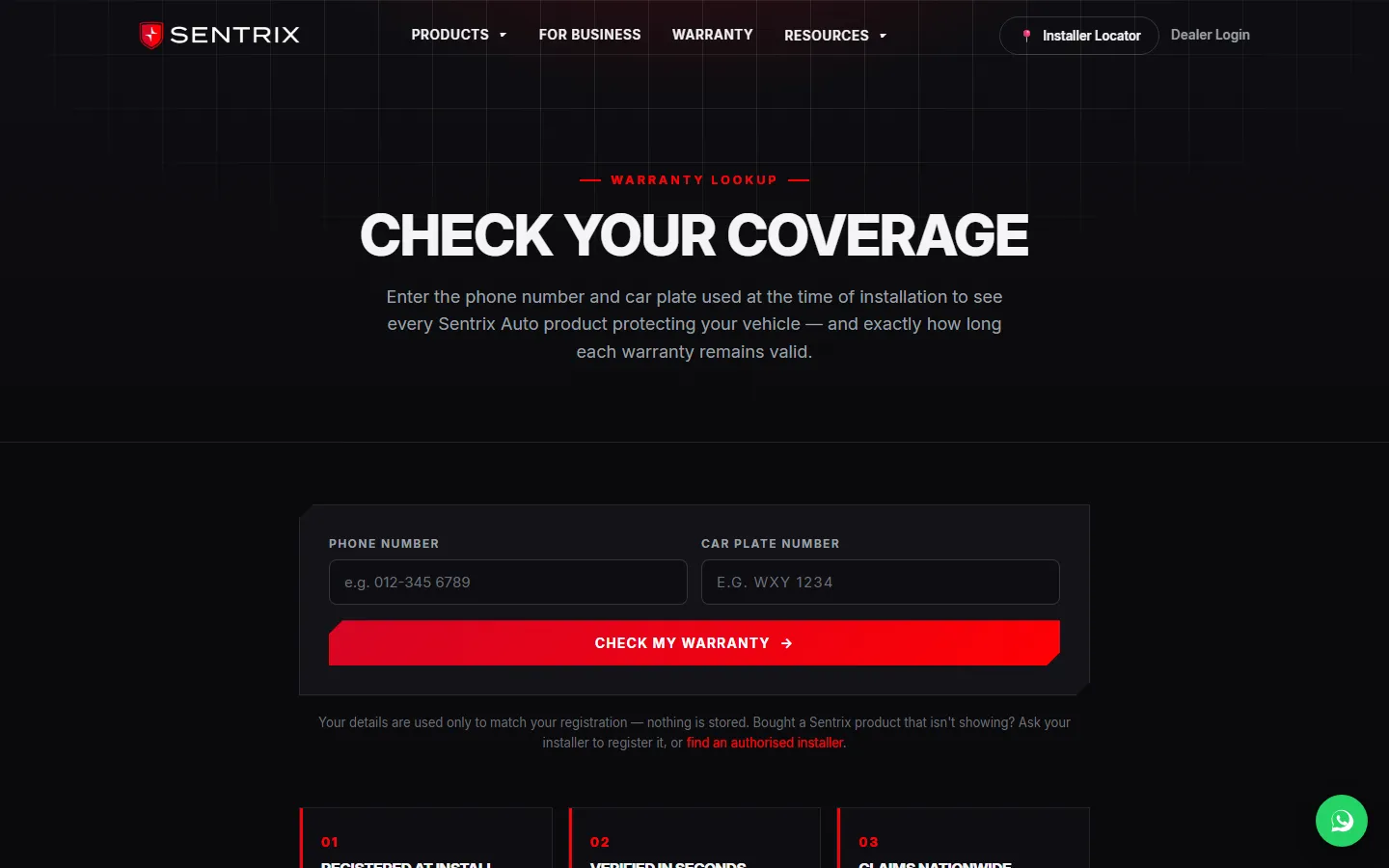
An authorised installer registers every film against the car plate on the day it goes on, so there is no warranty card to lose. Owners enter the phone number and plate used at installation and see each registered film, its installation date, its validity and the time remaining, and the installer who fitted it. No account is needed.
When the installer adds the owner’s email, the owner also receives the warranty by email as soon as it is saved, sent from Sentrix’s own address. If the car is sold or the number changes, any authorised installer can ask for the record to be updated, and head office approves the change.
Claims start at any authorised installer, even one that did not fit the film: the installer files the claim with photos, head office decides, and the installer is told by email.
Registered
The installer records each film against the plate when it goes on.
Emailed
The owner receives the warranty from Sentrix’s own address.
Checked
A phone number and plate show the cover at any time.
05Installer locator
A map of authorised installers, kept current by the installers.
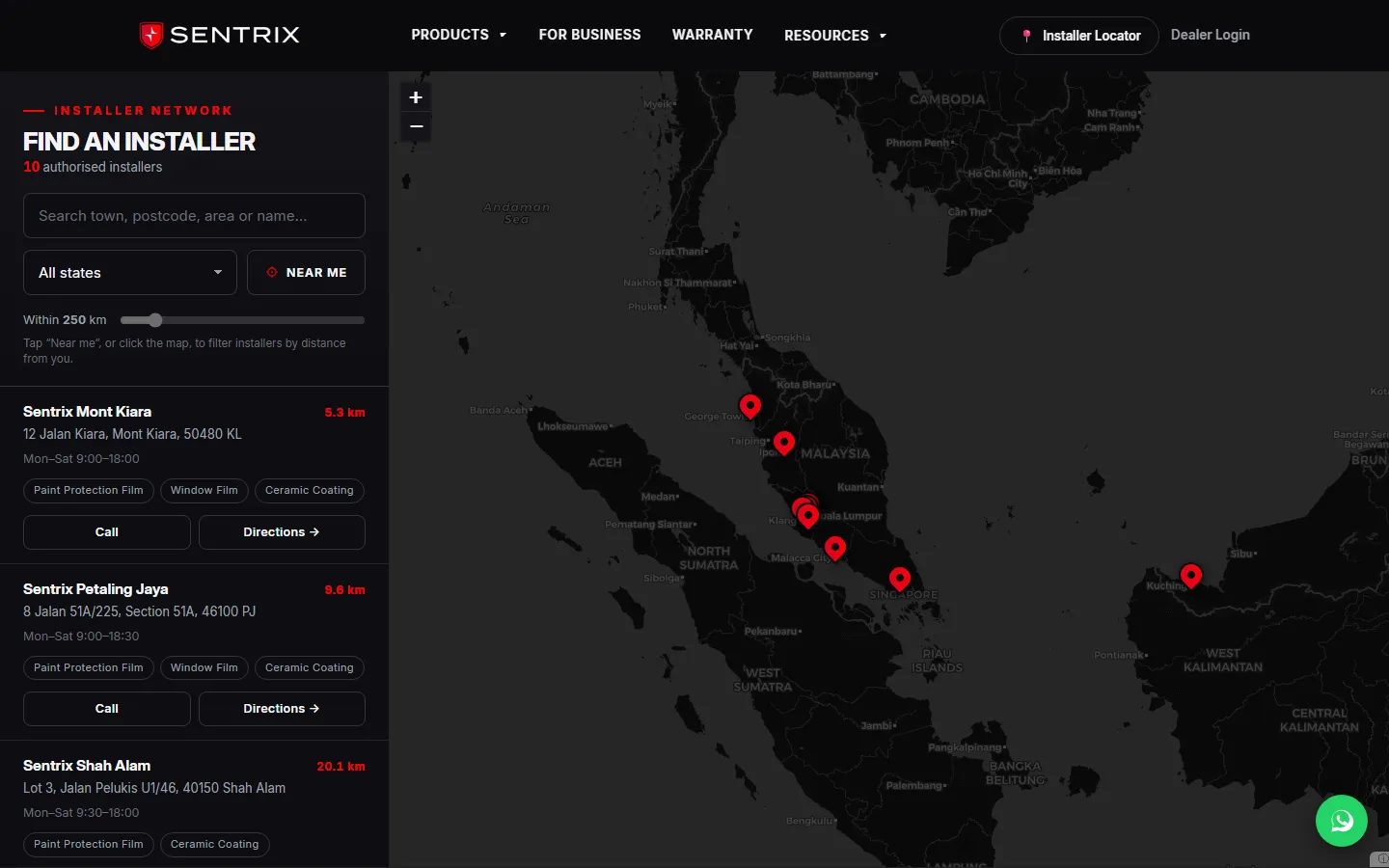
Drivers search a town, postcode or address, or tap Near me, then narrow by state, by product or service and by distance. Each installer shows its distance, address, opening hours, services, a call button and directions. On phones, the list and the map take turns on the screen.
Installers keep their own listing current from the dealer portal: map pin, address, opening hours for each day, logo, services, and links to their website and reviews. Head office approves each new shop, keeps the list of services installers choose from, and can move a closing shop’s warranties to another installer.
A dealer’s tier shows on the map too: higher tiers are listed first, with their own badge and pin colour, a link to their website and, at the top tier, their Google reviews.
06Dealer portal
One portal for every authorised installer.
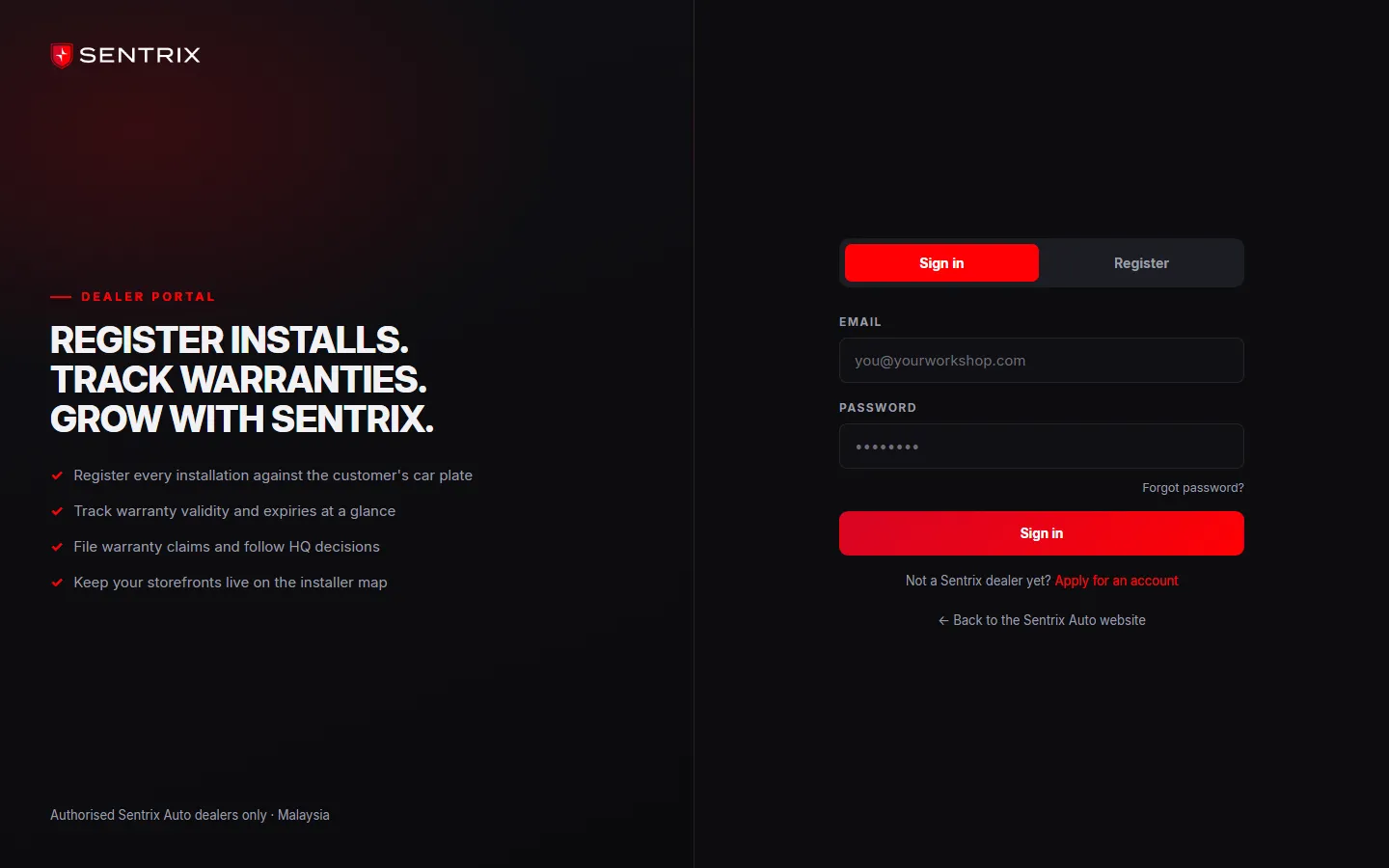
Workshops apply through the portal with their business details and documents, and head office approves each account before it can sign in. Head office can also add an installer itself, who then receives an email to set a password.
Approved installers register each installation: the car’s make and model, the film and its thickness or shade, the package and the window areas, and the serial of the roll it was cut from, chosen from the rolls their shop holds. From the same portal they print certificates, file claims with photos and follow each decision, ask for warranty updates, see their rolls and the cars fitted from each, follow their orders, and check their credits and tier.
Every screen has its own guide, and each step that involves the other side, from an application to a claim decision or an order update, sends an email.
Screens from inside the dealer portal and the head-office admin are not shown on this page, because they hold dealers’ and customers’ records.
07Head office
Head office runs the whole network from one admin.
Sentrix’s team approves, edits and suspends dealers, reads their application documents, and can edit any shop’s details without sending it back for approval. Every warranty, claim and transfer request is in one place, to decide, correct or move to another installer, and an installer can only be removed once its records have moved.
The same admin manages the films with their photos and data sheets, the list of car makes and models, the dealer logos for the home page, news articles and website enquiries. An overview shows the network’s figures, and an activity log records who did what and when.
Saving a change refreshes the public pages it affects straight away, so the map and the site update as soon as head office saves.
08Stock and orders
Every roll tracked, from the factory sheet to the car.
Each roll of film has its own serial. Head office loads the factory’s stock sheet as a spreadsheet, maps any new factory code to its product once, and can add or remove a single roll by hand. A roll’s history shows every move, from stock to the dealer to the cars fitted from it, and returns and write-offs are recorded the same way.
When an installer registers a car, the roll serial is checked: a serial with no stock record is refused, and anything else that does not match is saved and flagged for head office, on a report of every registration still to be resolved.
Every sale is an order at the dealer’s tier price, keyed in by head office or placed by the dealer once head office opens online ordering, and head office can change a line’s price or give a percentage off. Approving an order means picking its rolls by typing or scanning part of the serial, and they become the dealer’s stock at once. Dispatch and payment are tracked beside it with the payment slip attached, and an order can be rejected before approval, or reversed after it with a reason, which puts its rolls back in stock.
Order in
Keyed in by head office or placed by the dealer, at the dealer’s tier price.
Approved
The rolls picked by serial become the dealer’s stock.
In SQL Account
The approved order goes to the accounts as a sales order.
09SQL Account
Approved orders go into SQL Account without retyping.
Sentrix keeps its books in SQL Account, a desktop accounting package, so the platform feeds it instead of replacing it. Head office downloads approved orders as an Excel file in the layout SQL Account’s own import tool reads, and SQL turns each one into a sales order, which Sentrix carries on to a delivery order and an invoice as usual. Each line carries SQL’s item code and the serials of its rolls.
Each new dealer gets the next customer code in Sentrix’s own range, and its first export brings SQL a customer file with the dealer’s SSM registration number and tax number for e-Invoice, so nobody types dealers into SQL either. SQL’s invoice listing can be imported back to match each order to its SQL number. The import was proven with Sentrix’s team on their own SQL Account in November 2026.
10Rewards and tiers
Credits and tiers for the dealers who sell the most.
Dealers earn credits on every paid order, at a rate head office sets for each product group and tier, plus a bonus on large orders. Credits expire after a set time, those expiring soonest are spent first, and dealers redeem them for items on head office’s reward list. Head office approves each request, and a reward roll leaves stock like any other.
A dealer’s tier follows its paid orders over a rolling period and sets both its prices and its place on the map. Head office can give a starting tier, approve the top tier, adjust a balance and enter opening balances for dealers who traded before the platform. Dealers see their balance, what expires when, and how close they are to the next tier.
11Behind the platform
Fast public pages, and private records.
The platform runs on Cloudflare. Public pages are built once and served from the edge, then refreshed and warmed whenever head office saves a change. Records sit in a database at the edge, uploads such as claim photos and dealer documents in private storage, and the home page video streams in a way Safari can play.
Dealers and head office sign in to separate areas with rate-limited logins and reset links that expire, and changes are recorded in an activity log. Google Analytics runs only on the public pages and only after the visitor agrees, never on the warranty check, the contact form or the portals.
We look after it as an ongoing engagement: new films and pages as Sentrix adds them, the changes its team asks for, and monitoring of hosting usage and email delivery.
Everything we built
Everything in the platform, by who uses it.
The chapters above tell the story. This is the full list. Some parts are switched on by head office as it rolls them out to its dealers.
Drivers and owners12
- Brand site in Sentrix’s own look
- A page for each of 11 films
- Specification tables and data sheets to download
- Film comparison on measured figures
- Core Colour catalogue: 213 colours on the car
- Site search across pages, films, FAQs and articles
- Warranty check by phone number and car plate
- Warranty by email, when the owner gives one
- Installer locator with Near me and distance
- FAQs with search, product care and news
- Contact form, WhatsApp and call links
- Newsletter sign-up
Installers, in the dealer portal11
- Online application with documents
- Installation registration with roll serials
- Printable warranty certificates
- Claims with photos, and their decisions
- Warranty update requests
- Shop listing: pin, hours, logo, services, links
- Their rolls, and the cars fitted from each
- Orders at their tier price, with payment slips
- Credits, expiry dates and tier progress
- Password reset by email
- A guide on every screen
Head office9
- Dealer approval, editing and suspension
- Installers and shops added directly
- Warranties, claims and transfers in one place
- Shop approval, and moving a closing shop’s warranties
- Films, photos, data sheets and the car list
- News articles and website enquiries
- Core Colour list import and on/off switch
- Overview figures and an activity log
- Emails for applications, claims, orders and rewards
Stock, orders and accounts9
- Roll registry by serial, from factory sheets
- Roll checks when a car is registered
- Orders keyed in, or placed by dealers
- Approval by typing or scanning roll serials
- Dispatch, payment, rejection and reversal
- Tier prices, line prices and discounts
- Excel export for SQL Account’s import
- Customer codes and e-Invoice details for SQL
- SQL invoice numbers matched back to orders
Rewards and tiers7
- Credits on paid orders, by product group and tier
- A bonus on large orders
- Expiry, with the soonest-expiring spent first
- Reward list and redemption requests
- Tiers from each dealer’s paid orders
- Starting tiers, adjustments and opening balances
- Tier badges and order on the public map
Behind the platform7
- Hosting on Cloudflare, pages served from the edge
- Pages refreshed the moment head office saves
- Private storage for photos and documents
- Rate-limited sign-in for dealers and staff
- Analytics only after consent, never on the portals
- Search-friendly titles, headings and structured data
- Monitoring of hosting and email delivery
From brief to production · 2026
The delivery, and what it leaves the team with.
July 2026
Design and build
The brand site, warranty registry, installer locator, dealer portal and head-office admin, on Cloudflare.
August 2026
Live on sentrixauto.com
Launched on 19 August with Sentrix’s new logo and photography.
September 2026
New films
Pages for CORE CRYSTAL, PRIME ZENITH and PRIME SPECTRA, PRIME 90 and 99 redesigned, and their technical data sheets.
October 2026
Dealer system and redesign
Head office adds and edits installers directly; stock, orders with SQL Account, rewards and the owner’s warranty email go live; every page moves to the new design.
November 2026
Core Colour and sales orders
The 213-colour catalogue opens; approved orders reach SQL as sales orders, registrations check the roll serial, and the home page plays Sentrix’s own video.
One record from factory to car
A roll can be followed from the factory sheet through the order and the dealer to the cars fitted from it and the warranty the owner checks.
Orders entered once
Approved orders and new dealers reach SQL Account through its own import, instead of being typed in a second time.
A network that serves itself
Installers register warranties, file claims, keep their map listing current and follow their orders and credits in their own portal.
Status at 11 November 2026: sentrixauto.com is live, and the warranty registry, installer locator, dealer portal and head-office admin are in use. Every picture on this page is the live public site; the dealer portal and the admin are described but not shown, because they hold dealers’ and customers’ records. Head office opens some options to its dealers as it rolls them out, such as placing their own orders and redeeming credits.
For your next project
Explore the services behind this work.
Dealer accounts, registrations and orders at each dealer’s prices, with the head-office side behind them.
Stock tracked by item or serial, and moved by the orders and sales that use it.
Brand and product sites, dealer finders and dealer platforms for the motor trade.
Services it proves
Where Sentrix Auto is our example
Each of these service pages uses a part of Sentrix Auto to show the work. Open one to see what we would build for you.
- Business & corporate websitesA client brand website, redesigned in its own look in October 2026, with a dealer platform and warranty registry behind it.
- Landing pagesShows: Recruiting new dealersA page for one audience with one action: installers see what joining the dealer network gives them, then enquire.
- Website redesignShows: Products and rangesA client brand site redesigned in October 2026 from the brand’s own templates: every page in a new look, at the same addresses, with its search headings kept.
- Website maintenanceWhy care is scoped against what was launched: a brand site with a dealer platform, warranty records and an accounting link behind it, so an update touches more than pages.
- Dealer portalsShows: Dealer portalDealers register installations and keep their shop on the installer map; orders at their tier price move rolls into their stock and go on to SQL Account.
- Web appsShows: Dealer portalA dealer platform behind a brand site: dealers register installations and claims, and head office runs stock, orders and dealer credits.
- Workflow automationShows: Dealer portalDealers register each installation in their portal, and it becomes a warranty record customers can check with their phone number and car plate. An approved order moves its rolls into the dealer’s stock and goes on to SQL Account.
- AI automationShows: Dealer portalDealers register each installation in their own portal and it becomes a warranty record customers can check, and approved orders reach SQL Account without anyone retyping them.
- Automotive & dealersShows: Dealer portalA PPF and window film brand’s site with a dealer platform: installations become warranty records owners can check, and approved orders move stock to dealers and on to SQL Account.
Core systems
What this build is made of
These are systems we build repeatedly — each links to every other project that contains it, so you can compare implementations before deciding what you need.
Industry: Automotive & dealers
Unique to this build
Built specifically for this project rather than assembled from the shelf.
Roll registry
Every roll of film tracked by its serial, from the factory’s stock sheet to the dealer and the cars fitted from it.
Digital warranty registry
Films recorded against the car plate at installation, emailed to the owner and checked with a phone number and plate.
SQL Account link
Approved orders and new dealers exported in the layout SQL Account’s own import reads, with SQL’s numbers matched back.
Dealer credits and tiers
Credits earned on paid orders, and tiers from each dealer’s sales, shown in the portal and on the public map.
Core Colour catalogue
213 colour films, each pictured on the same car, with filters for series, colour family and finish.

Want something built to this standard?
Tell us what you have in mind and we'll put together a functional prototype of your project — free.