Scope the field workflow before you choose the app
This page follows one sequence: a job is assigned, the permitted details reach a device, work is recorded in the field, connectivity comes and goes, records synchronise, a supervisor approves, and the office picks it up. Every step has a normal path and at least one exception, and the exceptions are where a field project is won or lost. Roles, records, retention, access and who owns each integration all have to be agreed for your actual business rather than assumed from a template.
One fictional scenario runs through the page: a maintenance visit to a customer site with intermittent mobile coverage. It is invented for illustration and represents no live system. Whether an installed app is the right surface at all is the parent question, answered on mobile app development.
The job is the unit of work
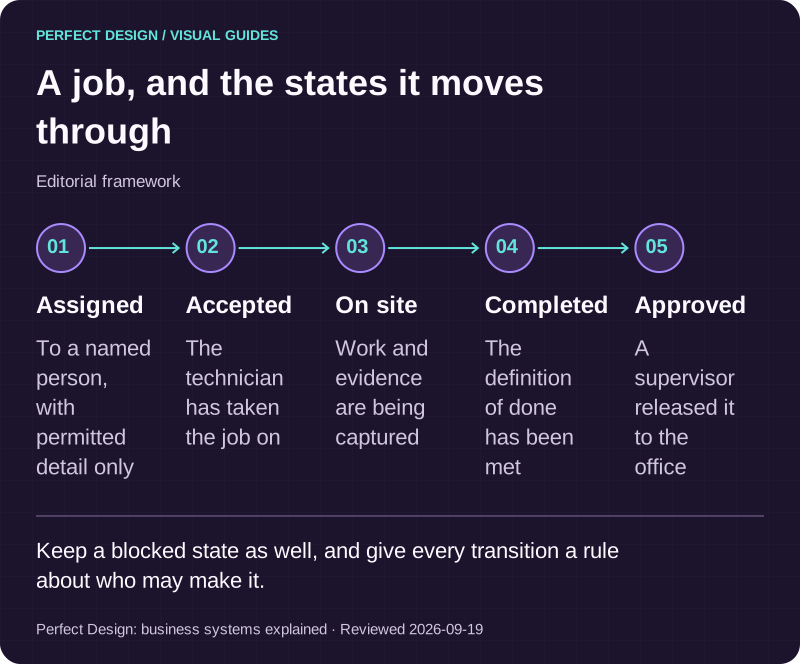
Everything hangs off one record. A job has an identity, a customer or asset it relates to, an assigned person, a status, a history of who changed what, and a definition of done. Get that right and the screens almost design themselves. Statuses should be few and unambiguous, because a technician standing in the rain will not distinguish between five shades of in progress. Assigned, accepted, on site, blocked, completed and approved is usually more than enough, and each transition needs a rule about who may make it.
Jobs arrive from somewhere, and that route is part of the scope. Odoo's field-service documentation, read on 18 September 2026, describes tasks created manually, generated from a confirmed sales order, or raised from a helpdesk ticket. That is one vendor's product rather than a universal model, but it is a useful prompt: decide every route a job can enter your system by, because each one brings its own data and its own gaps. Then decide what the field device is permitted to see, which is rarely the whole customer record.
| Workflow step | Assumed actor | Proposed system response | Exception | Acceptance evidence to collect |
|---|---|---|---|---|
| Receive a work order | Assigned technician | Download only the job and customer details that role is permitted to see | Reassignment or revoked access needs an explicit access decision | Role, assignment and device-access tests |
| Record work offline | Technician | Capture scoped notes, materials used and permitted photos with event identities | A damaged upload or a conflicting office edit stays visible and unresolved | Offline queue, conflict and attachment tests |
| Approve the completed visit | Supervisor | Review the synced work before the office handoff | Missing mandatory evidence returns the job for correction | Approval, audit and downstream reconciliation records |

A job, and the states it moves through
Editorial framework. Keep a blocked state as well, and give every transition a rule about who may make it.
Basis: Perfect Design: business systems explained. Reviewed .
Read the graphic as text
- Assigned. To a named person, with permitted detail only
- Accepted. The technician has taken the job on
- On site. Work and evidence are being captured
- Completed. The definition of done has been met
- Approved. A supervisor released it to the office
Working with no signal
Coverage in a basement car park, a plant room or a rural site is not an edge case, it is Tuesday. So decide the offline boundary deliberately. Android's offline-first guidance defines such an app as one able to perform all, or a critical subset of, its core functionality without internet access, with a local data source acting as the canonical source of truth the app reads from. That is platform documentation rather than a universal architecture, but the framing is the right one: decide which subset is critical, and be explicit that the rest waits.
What has to work offline, and what can wait
Capture almost always has to work offline, because a technician cannot come back later to remember what they saw. Anything permission-sensitive, such as opening a customer record that was not downloaded with the job, can reasonably wait for a connection. Local records and queued changes need visible states so nobody guesses whether their work was saved. And a lost or stolen device needs its own decisions in advance: what data may sit on it, how access is revoked, how local data is protected, and what evidence you keep of the revocation.

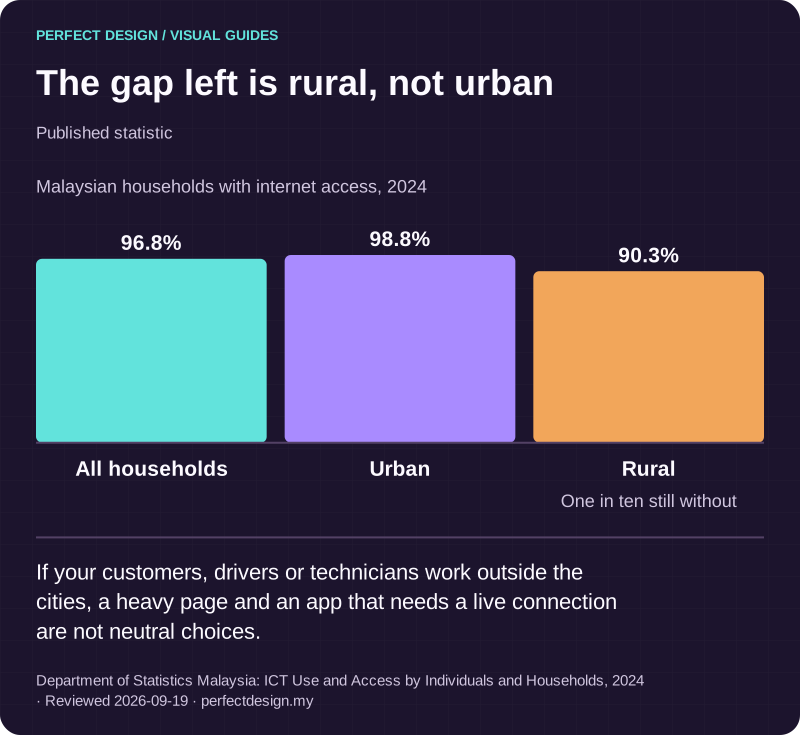
The gap left is rural, not urban
Published statistic. If your customers, drivers or technicians work outside the cities, a heavy page and an app that needs a live connection are not neutral choices.
Source: Department of Statistics Malaysia: ICT Use and Access by Individuals and Households, 2024. Reviewed .
Read the graphic as text
- All households: 96.8%.
- Urban: 98.8%.
- Rural: 90.3%. One in ten still without
Chart scale: Malaysian households with internet access, 2024.
How records get back to the office
Android's guidance distinguishes pull-based synchronisation, where the app fetches the latest data on demand, from push-based, where the local store mirrors the server and is told when data is stale, and notes that some apps use a hybrid of the two depending on the data. It says the choice depends on product requirements and available infrastructure, which is the honest answer. Let job urgency, coverage and how relational your data is decide it, rather than a preference.
Conflicts are the part to plan properly. When an office edit and a field edit disagree, something has to resolve them, and the same guidance points to versioning and a defined source of truth, with last write wins as one example rather than a default. Pick a policy per record, because the right answer for a job status is not the right answer for a free-text note. Whatever you choose, a conflict should be visible to a person rather than silently discarded.
Then define the handoff. A supervisor reviews the synced work, checks the mandatory evidence is present and approves, and only then does the job become an office record for invoicing, reporting or a warranty claim. The reporting inputs follow from that: the approved state, who acted, timestamps, materials used, permitted media, any exception raised and the reconciliation status. Decide those before the build, because they are what the whole workflow exists to produce.
Evidence people will actually trust
Photos, signatures and timestamps are the currency of field work, and they only settle a dispute if they are attributable. Decide what each photo has to be attached to, whether a caption or a type is required, how many are mandatory before a job can be completed, and what happens when a file is too large or the upload is damaged. A signature needs the same treatment: who signed, what they were shown when they signed it, and whether a printed name and a role are captured alongside.
Then decide the unglamorous half. Where the media is stored, how long it is kept, who may view it afterwards, and whether a customer can request a copy. Location adds another permission and another conversation with your team about what is being recorded and why. None of this is difficult, but all of it is expensive to add once people are already using the app.

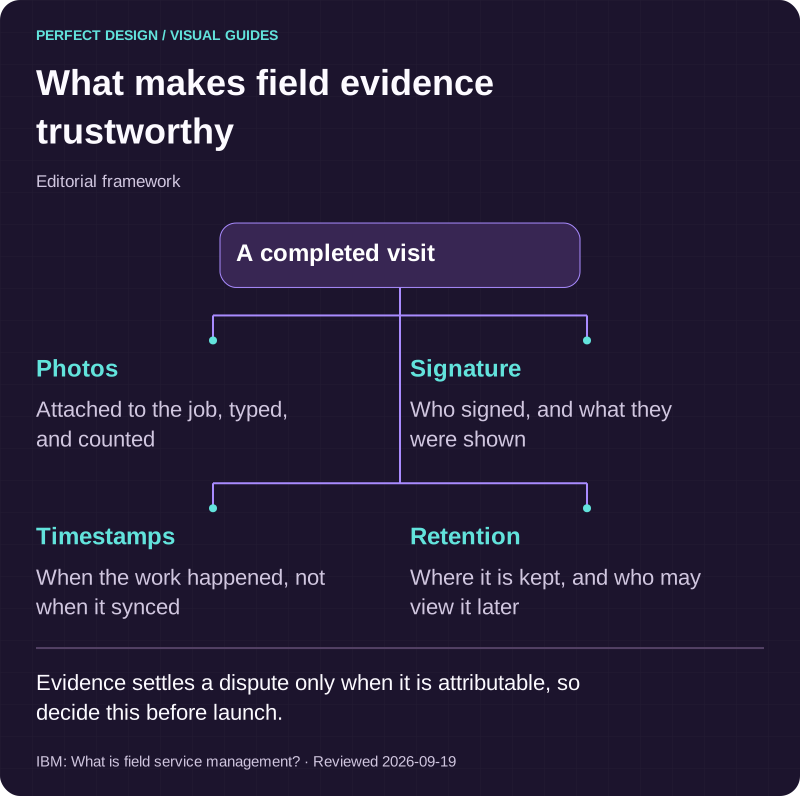
What makes field evidence trustworthy
Editorial framework. Evidence settles a dispute only when it is attributable, so decide this before launch.
Basis: IBM: What is field service management?. Reviewed .
Read the graphic as text
A completed visit
- Photos. Attached to the job, typed, and counted
- Signature. Who signed, and what they were shown
- Timestamps. When the work happened, not when it synced
- Retention. Where it is kept, and who may view it later
Staff adoption is the real risk
Field apps rarely fail on the code. They fail because the people using them find the paper faster, or because the app makes them look bad. Watch the job being done before designing anything. Count the taps. If completing a visit takes longer than the form it replaced, the workflow will be filled in at the end of the day from memory, and the evidence you built the whole thing for will be worthless. Involve two or three of the people who will use it, give them a build early, and take their complaints as requirements.

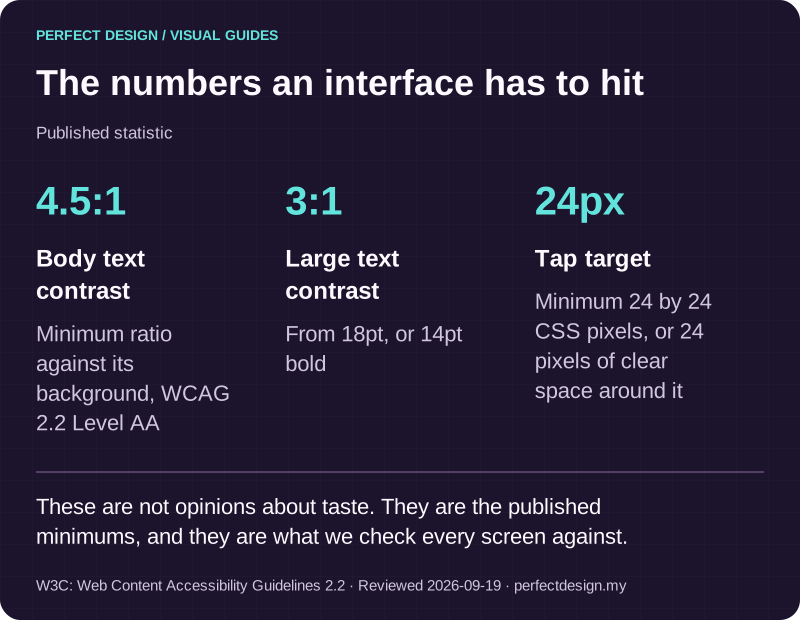
The numbers an interface has to hit
Published statistic. These are not opinions about taste. They are the published minimums, and they are what we check every screen against.
Source: W3C: Web Content Accessibility Guidelines 2.2. Reviewed .
Read the graphic as text
- Body text contrast: 4.5:1. Minimum ratio against its background, WCAG 2.2 Level AA
- Large text contrast: 3:1. From 18pt, or 14pt bold
- Tap target: 24px. Minimum 24 by 24 CSS pixels, or 24 pixels of clear space around it
What belongs in scope, and what does not
In scope: the job record and its statuses, the forms and evidence, the offline boundary, synchronisation and conflict policy, approvals, the office handoff, access and data ownership, retention, integrations, acceptance evidence and who owns it after launch. Out of scope on this page: generic business-process automation, stock and inventory ownership, the deeper mechanics of queues and retries, and detailed camera or location implementation. Each is a real subject with its own decisions.
And sometimes the honest answer is not a custom app. If an existing product already handles your core job flow and the gap is one integration or one report, configuring that is usually faster and cheaper. We would rather tell you which parts of your problem are already solved than build a second system beside a working one. Our VITALE build is a concept prototype rather than client work and is not a field-service app, but it shows the shape: separate role workspaces over one set of records, and an operator process that can be re-run and audited. It runs as a web platform, and nothing we have built is published on the App Store or Google Play yet.
Turning the workflow into a scoped next step
Bring one business problem, the people affected, a recording or walkthrough of how the job is done today, the tools already in use, the constraints you know about, the owner of each data source, and the evidence you would need to accept the result. That is enough for a useful first conversation. Send it as a scoped enquiry, and we will tell you which parts look solid and which need confirming. The workflow, the exceptions, the ownership and the evidence get agreed before anything is implemented, not during.