

What you are actually choosing
WooCommerce is a plugin that turns WordPress into a shop. Nothing is hosted for you, no percentage of your sales goes anywhere, and the database is yours. In exchange you take on the running of it: the server, the updates, the backups, the security and the pile of plugins that accumulate as requirements grow.
That trade suits some businesses very well. If you already run WordPress, publish content regularly, need unusual product logic, or simply want the option to change anything later, WooCommerce gives you room that a hosted platform does not. If you want to sell without thinking about infrastructure, it is the wrong tool and we will say so during scoping rather than after.

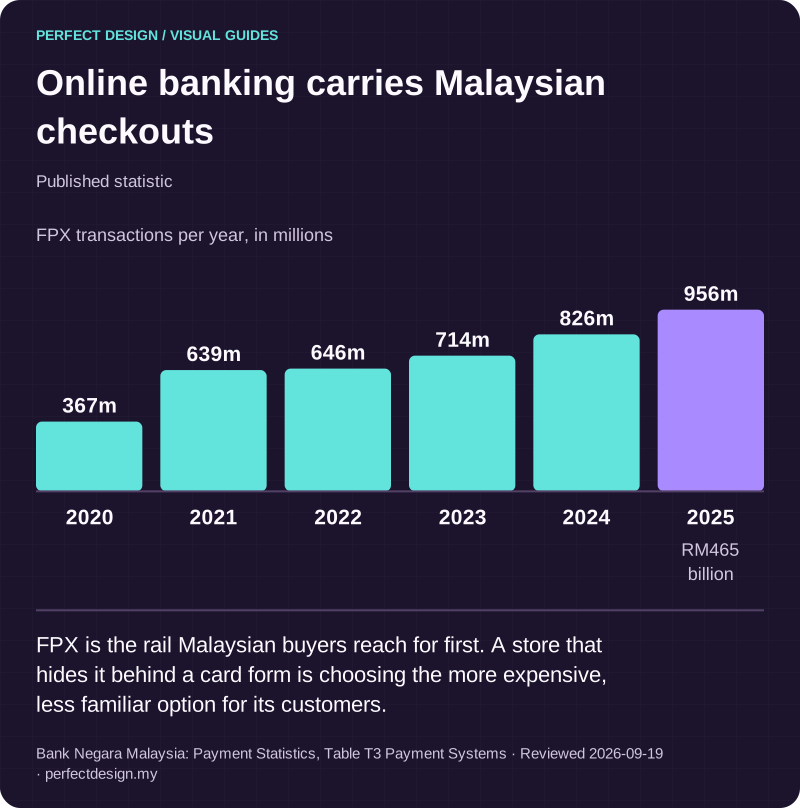
Online banking carries Malaysian checkouts
Published statistic. FPX is the rail Malaysian buyers reach for first. A store that hides it behind a card form is choosing the more expensive, less familiar option for its customers.
Source: Bank Negara Malaysia: Payment Statistics, Table T3 Payment Systems. Reviewed .
Read the graphic as text
- 2020: 367m.
- 2021: 639m.
- 2022: 646m.
- 2023: 714m.
- 2024: 826m.
- 2025: 956m. RM465 billion
Chart scale: FPX transactions per year, in millions.
The running cost nobody quotes
The plugin is free, which is where most comparisons stop and most budgets go wrong. A WooCommerce store has a real monthly cost, it is simply spread across things that do not arrive as one invoice.
| Item | Why it exists | Who usually owns it |
|---|---|---|
| Hosting | A busy store needs more than shared hosting; checkout is the first thing to fall over under load | You, or us under a care plan |
| Premium extensions | Subscriptions, bookings, advanced shipping and B2B pricing are paid add-ons, renewed yearly | You, and the renewals are easy to lose track of |
| Updates | WordPress, WooCommerce, the theme and every plugin update on their own schedules and occasionally conflict | Whoever maintains the site |
| Security | A public login and a large plugin surface make it a target; patching is not optional | Whoever maintains the site |
| Backups and restores | A backup nobody has restored is a hope, not a backup | Whoever maintains the site |
| Performance work | Plugins add queries and scripts; speed degrades gradually rather than suddenly | Revisited periodically |

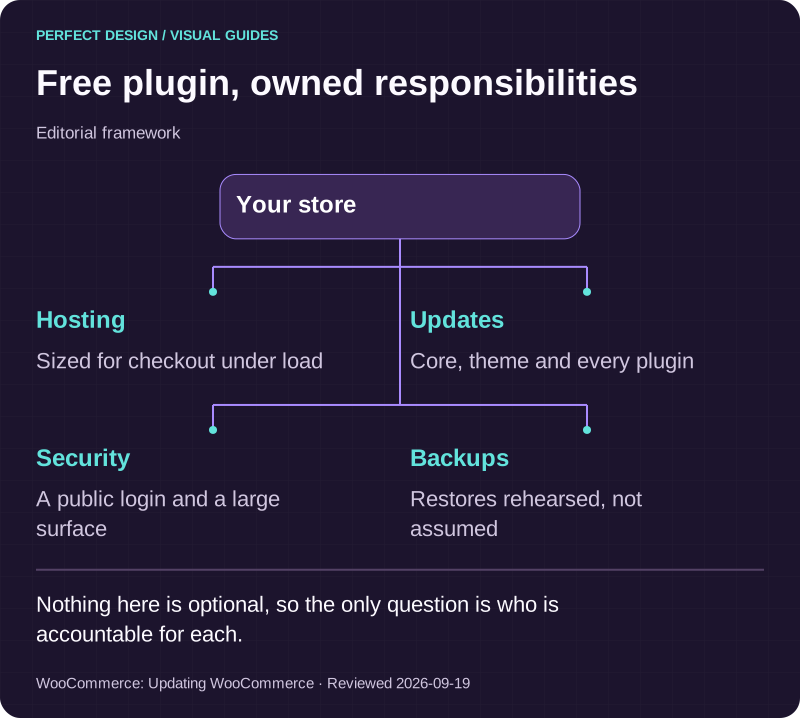
Free plugin, owned responsibilities
Editorial framework. Nothing here is optional, so the only question is who is accountable for each.
Basis: WooCommerce: Updating WooCommerce. Reviewed .
Read the graphic as text
Your store
- Hosting. Sized for checkout under load
- Updates. Core, theme and every plugin
- Security. A public login and a large surface
- Backups. Restores rehearsed, not assumed
Plugin decisions that age well
Most WooCommerce stores that become painful got there one plugin at a time. Each was installed to solve something real, and together they built a site nobody can update safely. The way out is to treat plugin choice as an architectural decision, not a shopping trip.
- Prefer fewer, better-maintained plugins. Check the last update date and how the developer handles WordPress releases, not the star rating.
- Build small custom pieces rather than installing a large plugin for one feature. Two hundred lines you own beat a suite you do not.
- Never take a plugin that rewrites checkout unless it has to. Checkout is where money is lost and where conflicts hurt most.
- Record why each plugin is there. A list nobody can explain is a list nobody dares remove.
Selling to Malaysian customers
A Malaysian store has specifics that generic WooCommerce guidance skips. Buyers expect online banking and QR alongside cards rather than behind them, so the payment step should present the methods people actually use first. Delivery needs real states and postcodes, and shipping rules that reflect how couriers price peninsular versus East Malaysia.
Gateway choice matters more than it looks, because the fees differ meaningfully by method and the settlement periods differ too. Our e-commerce hub sets out what each Malaysian gateway publishes, with the dates we read them. Whichever you choose, the store should record what was actually charged on the order rather than recalculating it later.

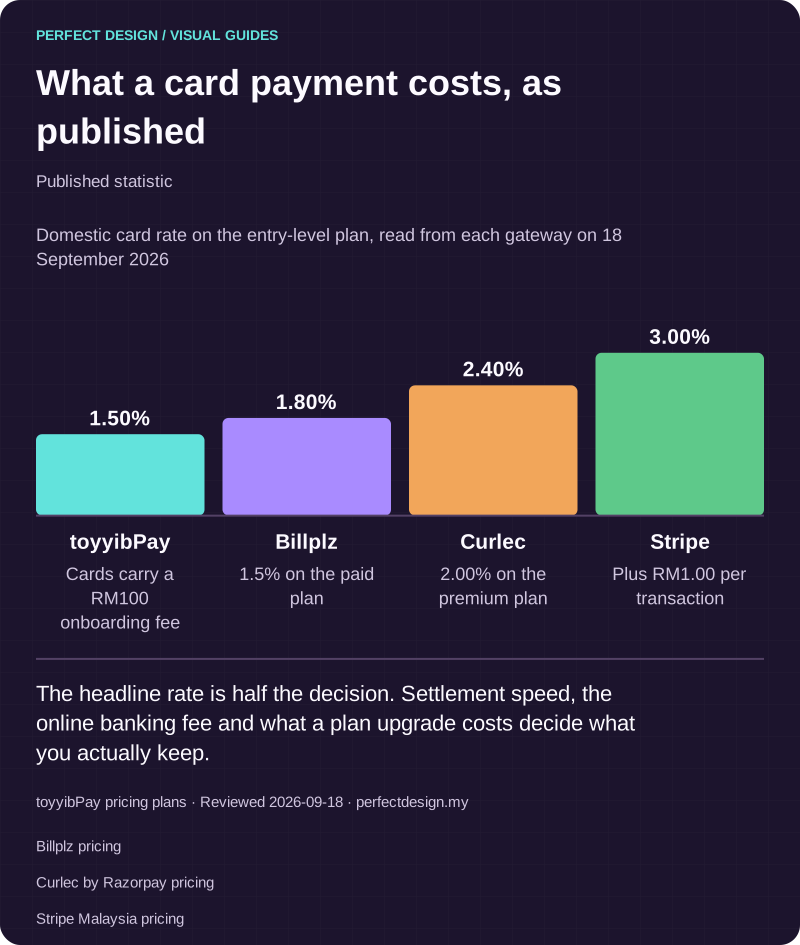
What a card payment costs, as published
Published statistic. The headline rate is half the decision. Settlement speed, the online banking fee and what a plan upgrade costs decide what you actually keep.
Source: toyyibPay pricing plans. Reviewed .
Also: Billplz pricing.
Also: Curlec by Razorpay pricing.
Also: Stripe Malaysia pricing.
Read the graphic as text
- toyyibPay: 1.50%. Cards carry a RM100 onboarding fee
- Billplz: 1.80%. 1.5% on the paid plan
- Curlec: 2.40%. 2.00% on the premium plan
- Stripe: 3.00%. Plus RM1.00 per transaction
Chart scale: Domestic card rate on the entry-level plan, read from each gateway on 18 September 2026.
The technical decisions that decide whether it holds up
A WooCommerce store that stays fast and stable under real traffic tends to have made the same handful of decisions early. None of them are visible on the storefront, which is why they get skipped.
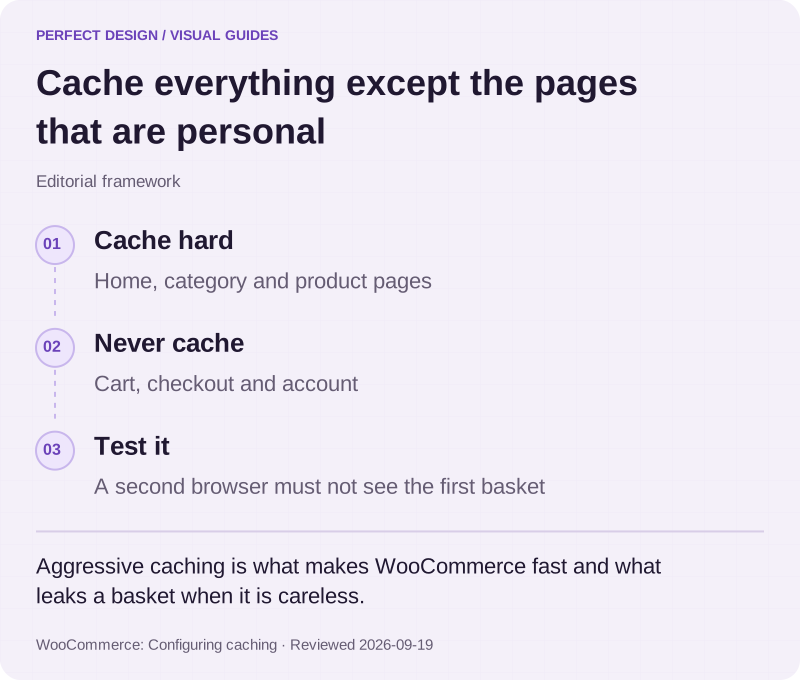
Caching has to understand the cart. Aggressive page caching is what makes WordPress fast, and it is also what shows one customer another customer's basket if it is configured carelessly. Cart, checkout and account pages are excluded, the rest is cached hard, and the exclusions are tested rather than assumed.
Product search is not the same as WordPress search. The default search looks at posts, not at variants, attributes or stock state, and it degrades badly as a catalogue grows. Anything beyond a small catalogue needs search built for products, with filters that reflect how people actually narrow down.
Stock has one source of truth. The moment stock also lives in a spreadsheet, a POS or an accounting system, you need to decide which one wins and what happens when they disagree. Deciding that after launch means reconciling it by hand for months.
The admin is a workplace. Your team will spend more hours in the order screens than any customer spends in the shop. Order lists that show the states your operation actually uses, and bulk actions for the jobs done daily, are worth more than a redesigned product page.

Cache everything except the pages that are personal
Editorial framework. Aggressive caching is what makes WooCommerce fast and what leaks a basket when it is careless.
Basis: WooCommerce: Configuring caching. Reviewed .
Read the graphic as text
- Cache hard. Home, category and product pages
- Never cache. Cart, checkout and account
- Test it. A second browser must not see the first basket
Selling business to business
A large share of Malaysian WooCommerce projects are not consumer shops at all. They are trade counters: account-specific pricing, credit terms, minimum order quantities, and customers who reorder the same twenty items rather than browsing.
WooCommerce handles that through extensions and custom logic, and it is worth being clear which parts are which. Customer groups and tiered pricing are well-trodden. Credit limits, approval chains and account statements usually are not, and are better built than bought. If the trade side is the whole business rather than a sideline, that is a portal with a shop attached, and worth scoping as one.

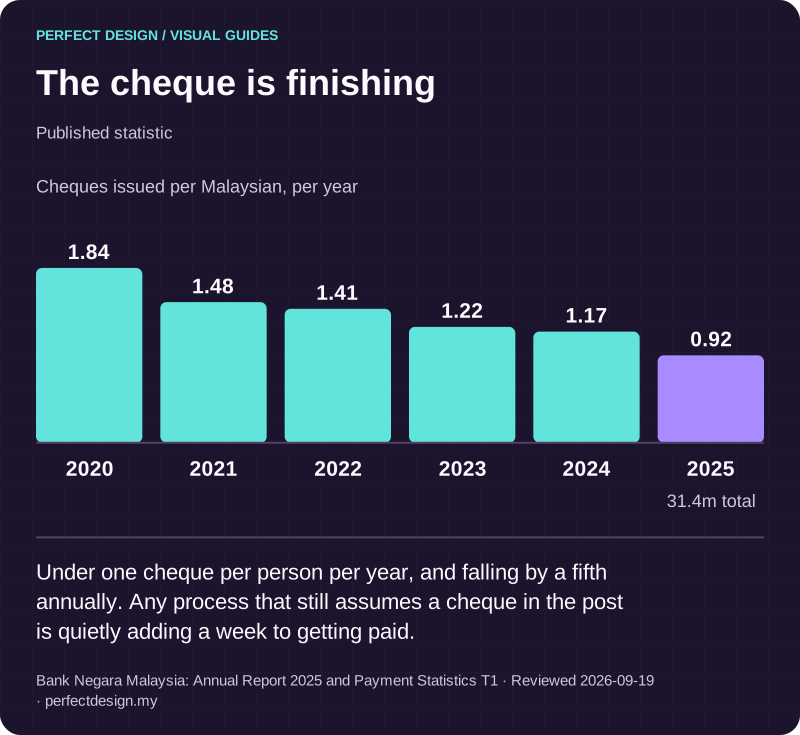
The cheque is finishing
Published statistic. Under one cheque per person per year, and falling by a fifth annually. Any process that still assumes a cheque in the post is quietly adding a week to getting paid.
Source: Bank Negara Malaysia: Annual Report 2025 and Payment Statistics T1. Reviewed .
Read the graphic as text
- 2020: 1.84.
- 2021: 1.48.
- 2022: 1.41.
- 2023: 1.22.
- 2024: 1.17.
- 2025: 0.92. 31.4m total
Chart scale: Cheques issued per Malaysian, per year.
Where WooCommerce runs out of road
There is a point where extending WooCommerce costs more than replacing it. The signs are consistent: a checkout bent so far out of shape that every update is frightening, product logic that no longer fits a products-and-variants model, a plugin stack where two extensions disagree about the same data, or a catalogue large enough that queries are the bottleneck.
At that point a custom build is usually cheaper over a two-year horizon, and we will tell you when we think you are there. Equally, plenty of stores are told they need a rebuild when they need a tidy-up, a faster host and six plugins removed. We audit before recommending either.
How we build it
We start from the order record and work backwards, the same way we approach any store. What a complete order must contain, what the customer is promised at the moment they pay, and what your team needs to fulfil it. Then the catalogue, the checkout and the admin views are built to produce that reliably, with a staging environment so changes are tested before they touch real orders.
Content stays editable by your team, which is WordPress's genuine strength, while the structural parts stay protected so an edit cannot break a layout. If you would rather not own the maintenance, it goes under a care plan and we run it.
Before you commit to a platform
Bring your catalogue size, how your products vary, the systems the store must talk to, and who will maintain it. That is enough for us to say whether WooCommerce, a hosted platform or a custom build fits, and to be specific about what each would cost you to run rather than to buy.